1
Table of Contents
1 Scope of supply
4
2 Order numbers
4
3 Introduction
5
3.1 Function
3.2 Status LED
6
6
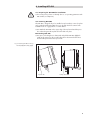
4 Installing OTT CBS
7
4.1 Preparing the OTT CBS for installation
4.2 Fastening OTT CBS
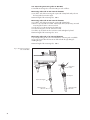
4.3 Connecting measuring tube to OTT CBS
5 Installing bubble chamber
9
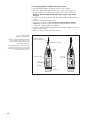
5.1 Installing bubble chamber for surface water
5.2 Installing bubble chamber for ground water
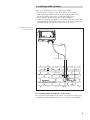
6 Connecting OTT CBS
6.1
6.2
6.3
6.4
6.5
Connecting
Connecting
Connecting
Connecting
Connecting
power supply
the OTT CBS to
the OTT CBS to
the OTT CBS to
the OTT CBS to
7
7
8
9
10
12
any datalogger using an SDI-12 interface
any datalogger using a 4 … 20 mA interface
LogoSens 2 or DuoSens using an SDI-12 interface
LogoSens 2 or DuoSens using a 4 … 20 mA interface
13
13
13
14
16
7 Activating the purge function
18
8 Setting operating parameters using DIP switches
19
8.1
8.2
8.3
8.4
8.5
Setting the type of SDI-12 interface
Setting measurement type of the 4 … 20 mA interface to level or depth measurement
Scaling the measuring range for the 4 … 20 mA interface
Setting the measuring system for the 4 … 20 mA interface
Setting measurement type of the 4 … 20 mA interface to water
level or pressure measurement
8.6 Factory setting of the operating parameters
9 SDI-12 Commands and Response
9.1 Standard commands
9.2 Advanced SDI-12 commands
19
20
20
21
21
21
22
22
23
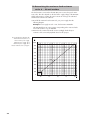
10 Determining the maximum load resistance at the
4 … 20 mA interface
24
11 Carrying out maintenance work
25
11.1 Activating purge function
11.2 Cleaning bubble chamber
11.3 Testing measuring tube
25
25
25
12 Status LED
26
13 Note about the disposal of old devices
26
14 Technical Data
27
3