1
2
R E F: 5 4 5 R C 0 9
Operating Instructions
Standard Remote Control
To Open the Powerlouvre™ Window
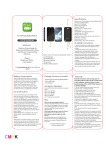
To fully open the Powerlouvre™ Window briefly press the top
OPEN button on the Standard Remote Control. To partially open
the Powerlouvre™ Window press and hold the OPEN button on
the Remote Control and release it when the window has reached
the desired position.
To Close the Powerlouvre™ Window
To fully close the Powerlouvre™ Window briefly press the bottom
CLOSE button on the Standard Remote Control. To partially close
the Powerlouvre™ Window press and hold the CLOSE button on
the Standard Remote Control and release it when the window has
reached the desired position.
OPEN
SELECT
Stopping the Powerlouvre™ Window
At any time when the Powerlouvre Window is opening, it can be
stopped using the CLOSE button. Similarly when the Powerlouvre
Window is closing, it can be stopped by the OPEN button.
To Toggle Between Operating The Upper And Lower
Blades or Between Channels of the Remote Receiver
Unit
To toggle between banks or units press the SELECT button briefly.
(<1 second)
Note: After 30 seconds the Standard Remote Control will default
back to controlling the upper bank or the first channel of the Remote
Receiver Unit. On 2-9 blade high Powerlouvre™ Windows or
Remote Receiver Units utilising only 1 channel, the SELECT button
has no function.
To Auto Close the Entire Powerlouvre™ Window or
All Motors Operated By A Remote Receiver Unit
To quickly and fully close the entire Powerlouvre™ Window or all
motors operated by a Remote Receiver Unit from any position,
press and hold the SELECT button on the Standard Remote Control
for 3 seconds. The top banks or the motors controlled by channel 1
will close first followed by the lower banks or the motors controlled
by channel 2.
w w w. b r e e zw a y. com. au M ay 2 0 1 1
TM denotes trademarks owned or licensed by Breezway Australia Pty Limited.
Copyright owned by Breezway Australia 2011.
CLOSE