1
Locking/Unlocking you tub
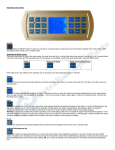
This button will operate the panel lock, so none of the other buttons can accidentally be pressed. To lock your hot tub
press the LOCKED button, the padlock icon will display in the control panel and this will lock the controls from accidentally being
pressed, to unlock your hot tub press and hold the LOCKED button until the controls are released. NB: If no activity is reported on
the control panel for 30 minutes the panel will automatically lock.
Setting the Clock
To set the clock on your hot tub press the CLOCK button, the time display will now flash, press HOUR to adjust the hour
and press MIN to adjust the minutes. Once set leave the control panel for a short time for it to let the time display stop flashing, the
time is now set.
Setting the Heat
Your hot tub is thermostatically controlled. There must be sufficient water in the hot tub for the heating and filtering to work
correctly
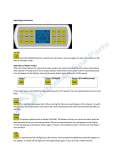
To heat your hot tub, press the HEAT button to turn on the heating. The heater icon will start flashing and Pump 3 will
first start running and display and also the Pump 3 icon. This pump must be running during heating to circulate the water through
the hot tub. After 10 seconds the heat icon will stop flashing on the display indicator the heating has started. Pressing the Heat
button again will switch off the heater and the circulation pump will stop running 10 seconds after. NB: if you press Pump 3 whilst
the hot tub is heating, this will override the automatic feature, so when the temperature reaches temperature, the heating will stop,
but the circulation pump will continue to operate.
To adjust the temperatures of your hot tub press the
button to adjust the temperature. The default temperature is 37c
(99f) (temperature range is from 30c to 45c/86f – 108f). Once the hot tub has reached the required temperature the heating will
automatically shut down until the temperature drops below the preset temperature, at that point, heating will automatically restart.
NOTE: Do not run the hot tub above 40c.
Freeze Protection
If it is detected that the water temperature drops below 5c the heating will automatically be turned on until the water temperature
reaches 9c.
Setting the Pre Heat Cycle
This function allows for the heating cycle to be switched on at a predetermined time for a pre-determined duration.
To switch the preheating cycle on press HEAT then the ON/OFF button, the “ON” will be displayed on the control panel.
To switch the heat cycle off, press the HEAT button to enter the programming, then press the HEAT button again and the display
will now show “OFF”.
Programming the Heating Cycle
To change the pre heating cycle press the HEAT button (when your hot tub is in standby mode) you will now enter the heating
programming mode. The time will start flashing. This is the time you wish the heating to begin. Use the HOUR and MIN buttons to
adjust the time. Press SET. You will now enter the duration you wish the hot tub to heat for. Use the HOUR and MIN buttons to
adjust this. Press SET. You can now enter the temperature you wish the hot tub to heat to. Use the TEMP button to adjust this.
Press HEAT button to return to Standby mode.