1
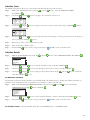
Interval Day Scheduling
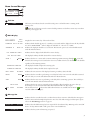
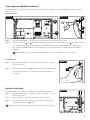
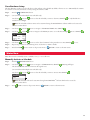
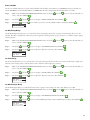
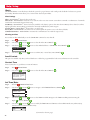
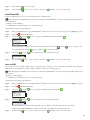
Selecting Interval watering allows you to specify the number of days between watering. Selecting an interval of 3 will prompt the controller
to water every 3rd day.
Step 1
– While in the ADVANCED/SCHEDULE DETAILS menu, use the Up
want to edit. Press SELECT
– Use the Up
or Down
arrows to navigate to TYPE. Press SELECT
Step 3
– Use the Up
or Down
arrows to select INTERVAL. Press SELECT
Step 4
– Use the Right
Step 5
.
.
arrow to navigate to WATERS EVERY designation. Modify using the Up
or Down
arrows. Press
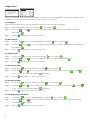
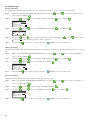
to save and advance to the next parameter. Enter 2 for every other day, 3 for every third day, etc.
INTERVAL
INTERVAL
WATERS EVERY 03 DAYS
CURRENT DAY 01
WATERS EVERY 03 DAYS
CURRENT DAY 02
WATERS ON LAST DAY
OF INTERVAL
WATERS ON LAST DAY
OF INTERVAL
– The CURRENT DAY designation represents the present day within the interval schedule. Enter 1 for first day, 2 for second
day, 3 for third day, etc. Press SELECT
Step 6
arrows to select the Schedule you
.
Step 2
SELECT
or Down
to save.
arrow to return to the previous menu or
– Press the BACK
HOME to return to the main screen.
Set Watering Restrictions
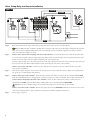
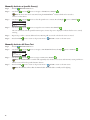
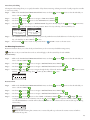
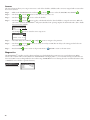
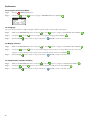
Restrictions function allows you to select the day and time frame you do not want any scheduled watering activity.
Note: There is only one time frame that can be set and it will apply to all the restricted days for each schedule.
Restriction Days
Step 1
– While in the ADVANCED/SCHEDULE DETAILS menu, use the Up
want to edit. Press SELECT
or Down
arrows to select the Schedule you
.
Step 2
– Use the Up
or Down
arrows to navigate to RESTRICTIONS. Press SELECT
Step 3
– Use the Up
or Down
arrows to navigate to RESTRICTION DAYS. Press SELECT
Step 4
– Use the Left
or Right
watering
.
arrows to navigate through the days of the week. Use the Up
. To activate watering, select
for that day. Press SELECT
.
or Down
arrows to restrict
to save.
RESTRICTION DAYS
S
M
T
W
T
F
S
TODAY IS THURSDAY
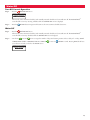
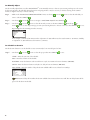
Restriction Time
Step 1
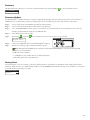
– While in the ADVANCED/SCHEDULE DETAILS menu, use the Up
want to edit. Press SELECT
or Down
arrows to select the Schedule you
.
Step 2
– Use the Up
or Down
arrows to navigate to RESTRICTIONS. Press SELECT
.
Step 3
– Use the Up
or Down
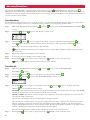
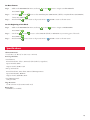
arrows to navigate to RESTRICTION TIME. Press SELECT
Step 4
– Use the Up
or Down
arrows to select START or STOP. Press SELECT
.
. Use the Left
or Right
arrows
to navigate between the hours and minutes. Use the Up
or Down
arrows to adjust the time. Press SELECT
to
TM
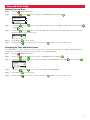
save. The EVOLUTION controller will not allow any schedules to activate between the start time and the stop time during
restricted days.
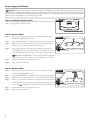
RESTRICTION TIME
START
STOP
10:00AM
03:00PM
Note: Scheduled watering that continues into a restricted day will stop at the time the restriction starts and will not
resume after the stop time.
17