1
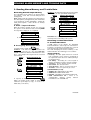
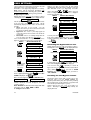
USER SETTINGS
READY 00:00
WALK TEST
ENTER CODE _ _ _ _
[4-digit master/user code]
(for checking state of next zone)
(example)
(5)
INSTALLER MODE
USER SETTINGS
(First display)
SET BYPASS
Z01: OPEN
<OK> TO BYPASS
Alternating
KITCHEN
KITCHEN
(5)
BYPASS LIST
<OK> TO RECALL
REPORT TO PRVT
SHOW BYPASS
Z01: BYPASSED
Alternating
(3)
(5)
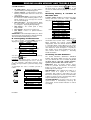
RECALL BYPASS
(1)
PRIVATE REPORT
VOICE REPORT
SMS REPORT TEL#
disable report
all
all (-op/cl)
all (-alerts)
alarms
alerts
op/cl
1st private tel#
2nd private tel#
3rd private tel#
4th private tel#
Tel. No.
Tel. No.
Tel. No.
Tel. No.
Redial attempts
Tel. acknowledge
1 attempt
2 attempts
3 attempts
4 attempts
single ack
all ack
1st SMS tel#
2nd SMS tel#
SMS Tel. No.
(1)
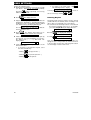
SET USER CODES
3rd SMS tel#
SMS Tel. No.
user code 1
4th SMS tel#
SMS Tel. No.
user code 1 1 1 1 1
SMS Tel. No.
[code]
user code 1
(example)
(for next user code 2,3....8)
for next (up) or previous (down) keyfob enrollment
(1)
ENROLL KEYFOB
(1)
enter keyfob #
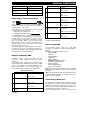
AUTO ARM OPTION
TRANSMIT NOW
disable autoarm
AUTO ARM TIME
enable autoarm
[time]
arm time_ _:_ _A
(1)
if not satisfied
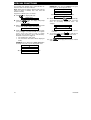
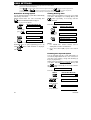
SET TIME&FORMAT
US FORMAT - 12H
EU FORMAT - 24H
TIME _ _:_ _A
TIME _ _:_ _
[time] e.g. 07:55P(4)
SET DATE&FORMAT
DATE DD/MM/YYYY
TIME 19:55
if not satisfied
DATE MM/DD/YYYY
DATE: _ _/_ _/_ _ _ _
(1)
SCHEDULER
(1)
(see detail “A”
in next page)
(date)(2) (e.g. 30/12/2007)
DATE 30/12/2007
[time] e.g. 19:55
TIME 07:55 P
(1)
DATE:_ _/_ _/_ _ _ _
enable autoarm
(See format & example in
“SET TIME&FORMAT”
in the next page)
SQUAWK OPTION
(1)
KEYFOB No : 1
(press any key)
if not
satisfied
(if it is the current option)
(1)
Keyfob No :
(date)(2) (e.g. 12/30/2007)
DATE 12/30/2007
squawk disable
sqwk low volume
sqwk mid volume
sqwk hi volume
(To review options, use
or
button)
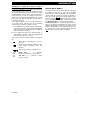
To move within most of
the menus, the following
keys can be used:
Moving forward
Show / confirm
data
Moving backward
Moving one level
up in the menu
Return to
“<OK> TO EXIT”
INSTALLER MODE
<OK> TO EXIT
Entrance to INSTALLER
MODE (described in
the installer guide)
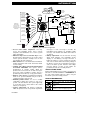
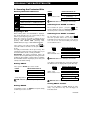
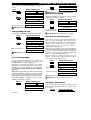
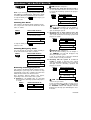
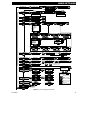
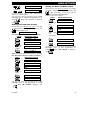
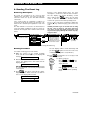
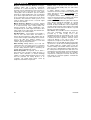
Figure 8 - Users Settings Flow Chart
D-302587
21