1
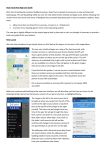
CONNECT VIA ANDROID
Locating your Grill’s WiFi password.
It can be found on the back of the digital control board of
retrofit units, or near the serial number plate on grill exterior.
Start the app. Wait for
the WiFi pop-up, then
press “WiFi settings.”
Make sure your WiFi is on.
When WiFi is enabled,
a list of networks will be
displayed.
Press the network that
starts with “GMG_”.
Enter the password for
your grill. Press connect.
It may take up to 1
minute to connect.
Once connected,
“Connected” will appear
below the network.
4.