1
matched. These interfaces will allow for a multitude of varying applications to be implemented on the LOGi-Pi.
Due to the high amount of flexibility of the board, some pin functions are shared between different peripherals.
This section will cover the details of the peripherals and how to use to while eliminating any pin conflicts.
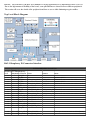
Top Level Block Diagram
RA2.1 Raspberry Pi Connector Interface
Pi-FPGA-ARDUINO Shared Pins
Default
Raspberry Pin State Raspberry
PI IO
Raspbian Pi Function FPGA
Arduino
Notes
1
3V3_RP
NC
2
5V_RP
Powers LOGi-Pi
3
GPI - HiZ RP_SDA
FPGA_SDA_GPIO
ARD_SDA
FPGA or Pi can access
4
5V_RP
Powers LOGi-Pi
5
GPI - HiZ RP_SCL
FPGA_SCL_GPIO
ARD_SCL
FPGA or Pi can access
6
GND
7
GPI - HiZ GPIO_GCLK FPGA_GPIO
8
GPI - HiZ RP_TX
FPGA_GPIO_RX
ARD_Master_RXFPGA or Pi can access
9
GND
10
GPI - HiZ RP_RX
FPGA_GPIO_TX
ARD_Master_TX FPGA or Pi can access
11
GPI - HiZ GPIO_GEN0 FPGA_MODE0_GPIO
12
GPI - HiZ GPIO_GEN1 FPGA_MODE1_GPIO
13
GPI - HiZ GPIO_GEN2 FPGA_GPIO
14
GND
15
GPI - HiZ GPIO_GEN3 FPGA_GPIO
16
GPI - HiZ GPIO_GEN4 FPGA_INITB_GPIO
17
3V3_RP
18
19
GPI - HiZ GPIO_GEN5 FPGA_PROGB
GPI - HiZ SPI_MOSI FPGA_MOSI_GPIO
the Arduino I2C Port
the Arduino I2C Port
the Arduino Uart Port
the Arduino Uart Port
FPGA pin cannot be used as GPIO (Reset)