1
CHECKING MESSAGES
CHECKING MESSAGES
To check messages
If you are using the fax
option, Unity plays the message summaries and any
voice annotations on your
fax messages.
If you are using the text-tospeech option, Unity also
plays your e-mail messages.
TIP Old messages are not
deleted automatically.
Delete unwanted
messages frequently
to save space.
PHONE
a Call Unity and log on.
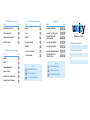
Use these keys after a message
TASK
b Press 1 to hear new messages,
TASK
KEY
Repeat
1
Mark as new
6
Save
2
Reverse
7
Delete
3
Deliver an e-mail or fax to
a fax phone number*
8
Reply
4
Hear summary
9
Forward message
5
or
press 3 to review old messages.
c Use the following keys to manage your
messages and to control playback.
Use these keys during a message
TASK
KEY
TASK
* Available only if you are using the fax option.
KEY
Repeat
1
Reverse
7
Save
2
Pause or continue
8
Delete
3
Fast-forward to end
Change volume
5
Use these keys anytime
TASK
1
KEY
9
Cancel or back up
KEY
*
TASK
Skip or move ahead
KEY
#