1
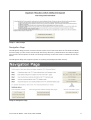
Key Parameters Page
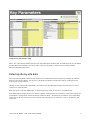
The Key Parameters Page provides a central location for the user to configure the setup of the TTC
Financial Model.
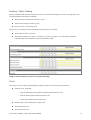
At this page the user can make the following selections:
► The name of the TTC Consortium
► The number of sites in the TTC Consortium and the name of each
► The number of partners to the TTC Consortium and the name of each
► Student funding rates by VET (Vocational Education Training) level and SRP (Student Resource
Package per-capita funding)
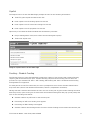
► Automatic indexation rate and indexation settings for each funding and cost line
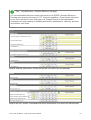
Once all desired settings have been applied, activate the ‘Click to apply Key Parameter settings’ button
and return to the Navigation Page to proceed.
Concept
Manual and automatic indexation
The TTC Financial Model supports both manual and automatically indexed
approaches to assigning funding and cost items over the five year planning horizon.
Using manual data entry, the user is required to input a value for each of the five
years covered by a funding or cost item. Using automatic indexation, the user
selects an indexation rate – when the user subsequently inputs year one data for a
funding or cost item the indexation rate is automatically applied to populate years
two through five. Automatic indexation settings are applied in the ‘Key Parameters’
page and may be specified to apply to all funding and cost items or, alternatively, on
an item-by-item basis.
Tip
‘Click to apply Key Parameter settings’ button
Once desired settings have been applied to the Key Parameters page ensure that
the ‘Click to apply Key Parameter settings’ button is activated before advancing.
Model settings will only be updated after the button has been activated.
TTC Financial Model: User Guide, March 2009
3