1
User Manual
Chapter 8: Appendix
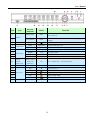
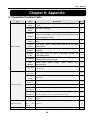
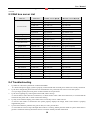
8.1 Operation Function Table
Type
Title
Time
setting
Language
select
time
Set system language
26
27
Record
setting
Set image quality, resolution, volume, record mode an pack
time
10
Record
search
Time based search, channel based search and rec. mode
based search.
12
Record
Specified time playback, scheduled playback, file list
12
Playback
playback
Playback
mode
Play, play frame by frame, multi-speed forward and
multi-speed rewind
13
File backup
USB flash disk and removable HDD backup, DVD recorder
backup and network download
13
Check HDD
auto-overwrite
15
HDD
Manage
VID Setting
User
password
Alarm
setting
status,
usage
space,
setting
HDD
Adjust VGA resolution, select system and volume control, set interval and
channel display
Set or modify user password
Set HDD loss, HDD space, video loss, I/O status, alarm management and
Email alarm
Motion
detection
Set on/off status of MD; select sensitivity and set motion detection area.
PTZ setting
Select CH and set PTZ protocol, baud rate and PTZ address for the CH
Mobile
surveillance
Set user name, password and server port.
System
maintenance
Set system auto maintenance, maintenance time regularly, system upgrade,
Display
PIP display, Zoom in/out, split mode, auto sequence and cruise
mode
Network setting
Set system date/time, display format and day-light saving
9
setting
Advanced Setting
Page
Set CH title and position; adjust image color parameter
value; set CH display to ON / Off and time display/recording
time overlaying to On/Off.
Channel
Basic setting
Description
Network
and
Port
ex-factory default value recovery and manual restart system
26
26
15
25
19
19
27
display
Select network mode and set net-viewer port, web port, DNS and DDNS
parameters.
10
Real-time video surveillance remotely
32
setting
Network Function
Live display
36