1
Before using CARE-2, the user is suggested to read two introductory chapters in a
Handbook of Capture-Recapture (Chao and Huggins, 2003) where some backgrounds
and historical development are provided.
You are welcome to use CARE-2 for your own research and applications as long as
you will not distribute CARE-2 in any commercial form. If you publish your work based
on the results from CARE-2, please use the following reference for citing CARE-2.
Chao, A. and Yang, H.-C. (2003) Program CARE-2 (for Capture-Recapture Part.
2). Program and User's Guide published at http://chao.stat.nthu.edu.tw.
The maximum input size in CARE-2 is 2000 individuals and 80 occasions. If your
data exceed these sizes, please send a mail to us indicating your size; we will send you
a modified program that fits your data input.
2. Download and Setup
Program
CARE-2
can
be
downloaded
http://chao.stat.nthu.edu.tw/softwareCE.html.
Anne
Chao’s
website
at
First doubly click the downloaded file
“care-2.exe” to unzip all files to a specified folder.
“setup.exe” to install the program.
from
Then doubly click the executable file
The source files along with six illustrative data sets
will be stored automatically in the specified folder in your computer.
Analysis without covariates
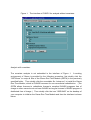
After the setup, doubly click the executable file “CARE-2.exe” to start the program
with the interface shown in Figure 1.
-2-