1
Table of Contents
Introduction ................................................................................... 1
Safe Handling Information .........................................................................1
Care and Handling of Your HP Personal Media Drive ...................................1
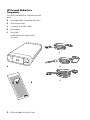
HP Personal Media Drive Components ........................................................2
HP Personal Media Drive Features ..............................................................3
System Requirements..................................................................... 4
Getting Started with Your HP Personal Media Drive ....................... 4
Inserting the HP Personal Media Drive into HP Computers with
Integrated Drive Bay .................................................................................4
Drive Indicators and Connectors.................................................................5
Connecting the Drive to a Computer without a Drive Bay ..............................5
Locating the Drive.....................................................................................6
Disconnecting the Drive Safely ...................................................................6
Installing Drivers and Software ...................................................................6
Formatting the Drive for Windows ................................................. 7
Reformatting the Drive with a FAT32 File System...........................................7
Using Your HP Personal Media Drive Software............................... 8
Using Roxio BackUp MyPC for HP Software ................................................8
Restoring Damaged or Erased Files.............................................................9
Transferring Files to Another Computer Manually..........................................9
Playing Games.........................................................................................9
Using Your HP Personal Media Drive with an HP Computer and
Personal Media Drive Bay .........................................................................9
Using the Security Lock..............................................................................9
Table of Contents
iii