1
Running Your First Job
Running Your First Job
We will now illustrate how to use your laser system to engrave on a piece of anodized aluminum from
start to finish. In this example, you will raster engrave a Test Card on a 2 x 3.5 inch (50.8 x 89 mm), 0.0195
inch (0.49 mm) thick piece of anodized aluminum.
Note: For this example we will be using CorelDRAW X3 and the CorelDRAW sample file provided on the
software CD. Install CorelDRAW, but do not start a new project.
Step 1 – Loading and Positioning the Material
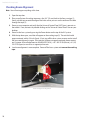
Open the top door and position the piece of anodized aluminum (1) into the upper left corner of the
table, against the rulers.
1
Step 2 – Creating the Graphic
Using CorelDRAW, open the sample graphic file found on the software installation CD that came with
the VLS system. The file is named ULSTest.cdr. The Software Installation CD contains test files in .cdr,
.eps, and .dxf.
21