1
AMAX
7
Schedules | en
21
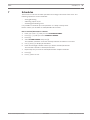
Schedules
This function is used to schedule operations according to the needs of the users. The
following operations can be scheduled:
–
Arming/disarming
–
Switching output on/off
–
Activating/deactivating users
It is possible to schedule up to 16 operations on a daily or hourly basis.
Please contact your installer to enable/disable this function.
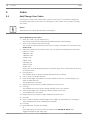
How to activate/deactivate a schedule
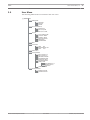
1. Enter your code + [▼] until you reach SYSTEM SETTINGS.
2.
Press [#] + [▼] until you reach SCHEDULE ENABLE.
3.
Press [#].
4.
Select SCHED ENABLE and press [#].
The available schedules are shown. Already selected schedules are checked.
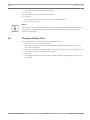
5.
6.
Use [▲] and [▼] to display all schedules.
Enter the two-digit schedule number you wish to activate/deactivate.
The selected schedule is checked/unchecked.
7.
Repeat step 6 if you want to activate/deactivate multiple schedules.
8.
Press [#].
9.
Press [-] twice to exit.
Bosch Sicherheitsysteme GmbH
User Guide
2014.09 | 03 | F.01U.295.569