1
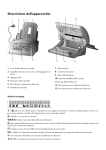
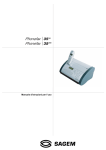
Description of the machine
9
11
12
10
13
1 Mains cable with power plug
8 Document guide
2 Document feeder and paper tray cover
9 Printer roller
3 Paper tray
10 Scanner lid
4 Document holder
11 Holder for «Plug’n’Print» card
5 Paper feed flap
12 Front ink film compartment
6 Operation panel
13 Rear ink film compartment
7 Telephone handset
Display symbols
f / F indicates whether you are sending or copying with a higher picture quality or with grey tones. If neither of the
two symbols is visible, the standard resolution is selected.
h appears when faxes are stored in memory.
áéíó indicates ink film consumption.
I appears when you receive another call while using the device or you receive a call in your absence (not available
in all countries).
W appears only if there are new SMS messages in the memory (only for devices with SMS functionality).
b shows that the built-in answering machine is switched on.
$ faxes as well as phone calls are received completely silent.
S/M/U three symbols on the display indicate the current settings..