1
Components Area
At the top of this area, the button "Components" allows to sort ascendingly and descendingly the list of
Uniface components. The checkbox allows to select / unselect all components.
The list contains a checkbox, the name of the component and an icon representing the type of the
component (form, service, ...). The checkbox allows to select / unselect one component. The icon shows
also the result of the test with the following meaning :
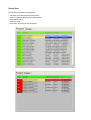
Passed : the testcase ran successfully
Failed: the assertion of the testcase was false after running the test.
An unexpected error occurred (undefined operation, undefined module, wrong number of
parameters, ...)
After running tests this icon can be used as a filter in order to display only the results of the selected
component.
Functions Area
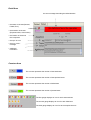
Run Testcases : It runs the tests for all selected Uniface components.
Display All Results : It displays all results of the last test session without taking into account of the
status of the test.
Display Passed Testcases : It displays only the tests which ran successfully.
Display Failed Testcases : It displays only the failed tests and the errors.
Remove Filter on Components : It displays the results of all components and not only the results of
the selected component.
Save Results into File : It saves the results into a file.
Open a Result File : It opens a Result file and loads all the results.