1
Chapter 13
Administration and Management
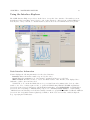
Using the Settings Console
The Netmon Settings console is where most administrative tasks are performed. To open this console, click
the Settings button in Netmon’s main toolbar, and choose from a number of maintenance and administrative
snap-ins, including:
• Basic Setup Tasks
• Define Alert Conditionals
• Customize Alert Templates and Alert Commands
• Use Data Management Tools which can help you perform data backups
• Manage Traffic and Host Filters
• Manage Netmon’s Host Name Database
• Define Local Networks for reporting and display purposes
• Manage Netmon System Services
• Manage the Port Label Database
• Manage Netmon User Accounts
68