1
Page 4 of 41
BlueRadios, Inc.
Copyright © 2002-2005
BR-AT_COMMANDS-100 Rev. 2.8.1.0.0
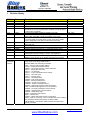
Note: To provide the best firmware architecture, design, and future profile support there is not 100% code
backwards compatibility in regards to certain AT Commands and responses. Client’s can specify any version of
firmware that is under BlueRadios configuration control. We also have custom versions not listed above (i.e.,
repeater and multi-point connection firmware options).
2
Introduction
Scope: This AT Command Set document along with BlueRadios™ evaluation board was created to enable
developers and integrators an opportunity to evaluate wireless networks using Bluetooth technology. The goal is
to make the transition to Bluetooth wireless networks as seamless and easy as possible for our clients. This
document will explain how to establish Bluetooth communications between two BlueRadios for both data and
voice applications in a point-to-point network (i.e., cable replacement, slave/master communications only).
“Our technology delivers a dynamic experience that comes out of the wireless delivery mechanism and
the freedom to connect others.”
Mark J. Kramer – CEO of BlueRadios
This document describes the hardware interface of BlueRadios Intelligent Serial Module. The Module is
designed to be built into an embedded device and to provide a simple and low cost Bluetooth API interface.
The module is designed to integrate with a wide range of applications and platforms with a simple electrical
and software interface using AT commands.
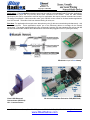
Background: The BlueRadios evaluation board is designed to accommodate the Companies Class1
or Class2 Bluetooth radio modem serial modules with 2.4GHz RF ceramic chip antenna (pictured
right). The BlueRadios SMT modules are Bluetooth ver1.2 compliant. The evaluation board enables
a stable platform environment to test serial RS-232 cable replacement and audio communications over
Bluetooth RF links before going directly to an embedded printed circuit board design and layout.
AT Commands: This document describes the protocol used to control and configure BlueRadios Bluetooth
Serial Modules. The protocol is similar to the industry standard Hayes AT protocol used in telephone modems due
to the fact that both types of devices are connection oriented. Appropriate AT commands have been provided to
make the module perform the two core actions of a Bluetooth device, which is make/break connections and
Inquiry. Additional AT commands are also provided to perform ancillary functions.
The CSR (Cambridge Silicon Radio) BC02 chipset in the BlueRadios modules is memory resource limited
therefore it is NOT proposed that there be full implementation of the AT protocol similar to an AT modem. In fact,
the protocol is similar enough so the existing source code written for modems can be used with very little
modifications for use with this serial module.
Just like telephone modems, the serial module powers up into an unconnected state and will respond to inquiry
and connection requests. Then, just like controlling a modem, the host or client can issue AT commands which
map to various Bluetooth activities. The command set is extensive enough to allow a host to make connections
which are authenticated and encrypted or not.
The BlueRadios serial radio modems can be configured,
commanded, and controlled through simple ASCII strings through the hardware serial UART or over a remote
Bluetooth RF connection.
1. All commands have the following format: “command”<cr>. Where “cr” represents carriage return 0x0D
2. Valid commands respond with a “<cr,lf>OK<cr,lf> or “<cr,lf>ERROR<cr,lf>. Where “lf” represents linefeed
0x0A. Only exceptions are ATSW20 and ATURST which do not reply.
a. Only exceptions are when setting baud rate, commanding a CPU reset, or Factory Reset.
3. All response data after the command response have the following format <cr,lf>data<cr,lf>.
7173 S. Havana Street, Suite 600
•
Englewood, CO 80112
• Tel (303) 957-1003 •
www.BlueRadios.com
info@BlueRadios.com