1
Version 4.3
Tax Form Processing
Tax Form Processing
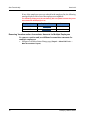
All tax forms are now processed as tape-filer.
The option Col 48 = N (non-tape filer) is no longer an acceptable option of the
30 Record.
Tax Exemptions
Statutory Deductions Page
Powerpay now displays a warning message if a zero value “0” is entered in the
Specific dollar amount to be taken’ fields in the Tax Options – Permanent
Values section of the Statutory Deductions page.
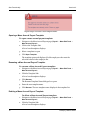
“As the ‘Specific dollar amount to be taken’ has been changed to zero (0) in the
‘Tax Options – Permanent Value’ section, the employee will now be subject to
the normal tax calculated according to their personal tax exemptions. If this is
incorrect, and the employee is to be no longer taxed, select the appropriate
exemption option from the Tax Status menu on the Hire/Profile page.”
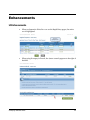
Hire/Profile Page
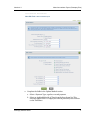
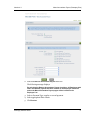
Powerpay now displays a warning message is a zero value “0” is entered in the
Federal and / or Provincial Tax Exemptions ‘Apply specific amount’ field on
the Hire / Profile page.
“As the XXX has been changed to zero (0) no exemptions will be applied and the
maximum tax will be deducted from the employee. If this is incorrect, and the
employee is to be no longer taxed, select the appropriate exemption option from
the Tax Status menu.”
Where XXX is either:
• Employees Federal Personal Tax Exemption
• Employees Provincial Personal Tax exemption
• Employees Federal and Provincial Personal Tax Exemptions.
Postal / Zip Code Messaging
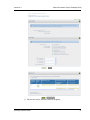
If an incomplete Postal or zip code is entered on the Hire/Profile page or the
Company Profile page, the following error message displays after the page is
saved:
“Postal/Zip code is incomplete. Please review and re-save the screen.”
If a province is selected but a zip code entered or a state is selected and a postal
code entered in any of the address information sections on the Company
Powerpay Release Notes
21