1
universal security
DEFCON® VPCL
combination cable lock
Using the DEFCON Security Base Plate
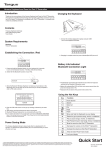
1. Choose a solid location to attach the DEFCON Security Base Plate: a piece of furniture, or metal cabinet.
If you plan to use the two screws, you can use the base plate as a template to pre-drill the holes.
2. Use the abrasive pad, then the alcohol wipe to prepare the area when you will attach the DEFCON Security Base Plate.
3. After the alcohol dries, remove the backing on the base plate to expose the adhesive and place it on the prepared
location. If desired, secure the base with the two screws.
NOTE: When using the adhesive backing, apply at room temperature - 60oF (16oC), and allow it to bond for more than 24 hours. Not
recommend for to use in outdoor or high humidity environment. Bonding to glass, ceramic tile, water-absorbent materials, copper, brass,
or plasticized vinyl without primer surface are not recommended.
Targus recommends using both adhesive and screw to provide maximum security. Using only the adhesive provides marginal security.
4. Place the DEFCON Security Base Plate cover as shown and slide it to the left or right to secure it in place.
5. Insert your DEFCON cable lock.
Recording your combination
Cable
Loop
Left combination
window
Right combination
window
Technical Support
For technical questions, please visit:
US
Internet: www.targus.com/support.asp
Australia
Internet: www.targus.com/au
Email: infoaust@targus.com
Telephone: 1800-641-645
New Zealand
Telephone: 0800-633-222
Product Registration
Targus recommends that you register your Targus accessory shortly after purchasing it. To register your Targus accessory, go to:
http://www.targus.com/registration.asp
You will need to provide your full name, email address, country of residence and product information.
Warranty
Targus warrants this product to be free from defects in materials and workmanship for one year. If your Targus accessory is found
to be defective within that time, we will promptly repair or replace it. This warranty does not cover accidental damage, wear and
tear, or consequential or incidental loss. Under no conditions is Targus liable for loss of, or damage to, a computer or other
device(s); nor loss of, or damage to, programs, records, or data; nor any consequential or incidental damages, even if Targus has
been informed of their possibility. This warranty does not affect your statutory rights.
User Guide
DEFCON is a trademark of Targus Group International, Inc. Features and specifications are subject to change without notice.
All trademarks and registered trademarks are the property of their respective owners. All rights reserved.
© 2008, Targus Group International, Inc. and Targus, Inc., Anaheim, CA 92806 USA.
PA492U / 410-0222-001C