1
Important Safety Instructions
1. Please read this manual thoroughly before operating the monitor.
2. Unplug monitor from the wall outlet before cleaning the LCD screen. Do not use liquid cleaners or aerosol
cleaners. Use ONLY a damp cloth provided.
3. Don’t use any unauthorized accessories not recommended by the manufacturer as they may cause
hazards.
4. Don’t operate this monitor near damp or wet surfaces.
5. Use only the recommend manufacturer mounting hardware accessories.
Slots and openings in the cabinet and the back or bottom are provided for
ventilation, and to insure reliable operation of the monitor and to protect it
from overheating, these openings must not be blocked or covered.
6. This appliance should be operated only from the type of power source
indicated on the marking label.
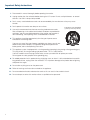
PORTABLE CART WARNING
(symbol provided by RETAC)
If you are not sure of the type of power supplied to your home, consult your
dealer or local power company. For appliance designed to operate from
battery power, refer to the operating instructions.
7. This appliance system is equipped with a 3-wire grounding type plug (a plug having a third (grounding) pin).
This plug will only fit into a grounding-type power outlet. This is a safety feature.
If you are unable to insert the plug into the outlet, contact your electrician to replace your outlet.
Do not ignore the safety purpose of the grounding plug.
8. For added protection for this product during a lightning storm, or when it is left unattended and unused for
long periods of time, unplug it from the wall outlet. This will prevent damage to the product due to lightning
and power-line surges.
9. Do not allow anything to rest on the power cord.
10. Follow all warnings and instructions marked on the appliance.
11. Do not overload wall outlets and extension cords as this can result in fire or electric shock.
12. Do not attempt to service this monitor without a qualified service personnel.
2