1
SC-HC55_35-RQTX1262.book
14 ページ
2011年4月1日 金曜日 午前11時34分
DAB operations
DAB (Digital Audio Broadcasting) is a new form of radio that is
broadcast digitally. Unlike regular analogue broadcasting, digital
radio deteriorates less, and is thus able to provide quality sound
closer to that of a disc.
DAB structure
Bands
There are two types of DAB bands, “BAND III” (receivable in this
unit) and “L BAND” (not broadcast in the United Kingdom and
not receivable on this unit).
Frequencies
There are 38 frequencies on BAND III. Among these, 10 are
used in the United Kingdom (current as of February, 2011).
Ensemble, station and service
The number of stations that makes up one frequency differs
between DAB and analogue radio. Analogue stations broadcast
on different frequencies, even if it is the same company doing the
broadcasting. With DAB, however, it is possible to broadcast a
number of stations on the same frequency.
In DAB terminology, an ensemble represents a group of stations
on the same frequency.
DAB reception method on this
unit
Depending on the region, there is a difference between
broadcast frequency and stations broadcast along the same
frequency.
For this reason, a memory of receivable stations should first be
created and then selected from those memorised stations as the
reception method.
DAB Auto scan
This function searches for currently receivable stations and
inputs them into the unit’s memory.
When DAB is selected for the first time, this function starts
automatically.
≥ Depending on some factors such as the broadcasting time
availability, the station may not broadcast even if it is stored
into the memory. If this occurs, “NO SERVICE” is displayed.
Station memory updating
When there is a station name change, or a new station begins
broadcasting, the unit memory is automatically updated when:
≥ the previous station name is selected.
≥ a new station is on the same frequency as another already
memorised station.
Deleting stations that are no longer broadcasting is not
automatic. If you want to delete a station, perform Auto scan
again and a new memory will be created.
When a new frequency begins broadcasting, stations on the new
frequency are not automatically added to the memory.
Perform Auto scan to add them to the memory. You may also
need to change the Auto scan range if the new frequency is
outside the factory-set Auto scan range (> 16).
Station tune
You can select stations from the created memory (> 15) in
alphanumeric order.
Preset function
You can easily select your favourite stations by using the preset
function (> 15).
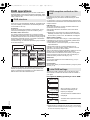
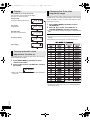
As shown in the diagram, an ensemble consists of a group of
stations with primary services and secondary services. This
means, for example, that commentary on sports events from
different areas can all be broadcast at once.
Initial DAB settings
The first time “DAB” is selected, this unit will start the “DAB
AUTO SCAN” and memorise the stations that are available in
your region.
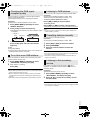
Press [EXT-IN, RADIO] repeatedly to select “DAB”.
When a frequency is tuned, the
ensemble corresponding to the
frequency is displayed.
The total number of available stations
is displayed.
RQTX1262
The station first in alphanumeric order
is selected.
14
≥ “SCAN FAILED” is displayed when the Auto scan is unsuccessful.
Adjust the antenna and restart the Auto scanning (> 15) or change
the Auto scan frequency range (> 16).