1
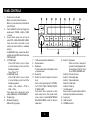
PANEL CONTROLS
1. - Press to turn on the unit.
- When on, press to mute the volume.
- When on, press more than 2 seconds to
turn off the unit.
2. - P ress SOURCE button will toggle the
audio source: TUNER -> USB -> CARD
-> Aux-in
3. - I n tuner mode, press once or more to
select FM1->FM2->FM3->MW1->MW2.
Press more than 2 seconds to auto
search and store stations in available
memory.
- In USB/CARD mode, press more than 2
seconds to enter MP3 search mode (see
“MP3 Playback”)
4. - In TUNER mode
Press DISP button once or more
to select display content with the
following sequence:
Freq->Time->PTY
- In USB/CARD mode
Press DISP button once or more
to select display content with the
following sequence:
Folder -> File -> Album -> TITLE ->
Artist -> Time
- P ress more than 2 seconds to enter
system MENU (see “SYSTEM MENU”)
5. - Program type
6. - Alternative frequency
- REG on/off (long press)
7.
8.
9.
- Traffic announcement identification
- Remote sensor
- Radio tune
- To fast search within a track/skip to next
or previous track
10. - Reset hole
11. - R otate the knob to adjust the volume
level.
- Push to change EQ preset: OPTIMAL,
FLAT, POP, USER, TECHNO, ROCK,
CLASSIC, JAZZ.
- P ush more than 2 seconds to enter
audio setup menu, then press briefly
once or more to select BASS/TREBLE/
BALANCE/FADER, rotate the knob to
adjust level.
2
12. - Button 1: Play/pause
P
ress more than 2 seconds if
you want to start playback from
the beginning of the first track
of your USB or SD/MMC card.
- Button 2: Intro play (10 sec.)
- Button 3: Track repeat play
- Button 4: Track random play
- Button 5: Folder down
- Button 6: Folder up
* 1~6 Radio preset
Press to tune in a preset station. Hold for
more than 2 seconds to store station.
13. - Aux-in jack
14. - USB connector
15. - SD/MMC card slot