1
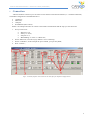
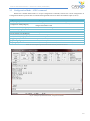
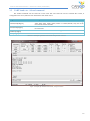
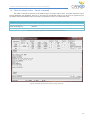
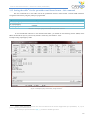
CANGO Telematic Interface - Serial User Guide (24/07/2014) 1 Connection After the hardware connection you can connect to the interface with terminal software (i.e.: Terminal or Hercules). The default configuration of the FMS interface is: 115200 bps; 8 Data bits; 1 Stop bit; No handshake (flow control). Below is an example about how to connect to the interface with Terminal and the steps you will need to do: 1. First you need to set: 2. 3. 4. “Data bits” to 8; “Parity” to “none”; “Stop bits” to 1; “Handshaking” to “none” or “RTS/CTS”; Set the “Baud rate”; From factory by default is set to 115200 bps; Set the “COM Port”; In this example the port is COM1, your port may differ; Press “Connect”; Fig 1 - Terminal, before connection to the interface for default configuration. 2