1
Global functions
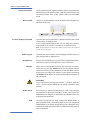
Display - Value +/• Display and value adjustments
Function
• in combination with Store
Store
• Storage of presets
Fatar Touch
• Create your own velocity
curve
Fatar Touch
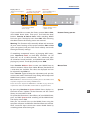
With the unique Fatar Touch feature you can create your
own personal velocity curve and adjust NUMA Piano to your
playing style, and to your external sound modules.
Press Fatar Touch. Start playing on the keyboard and NUMA
Piano learns your touch. You have 1 minute time to play. If you
would like to stop the process earlier, just press Fatar Touch
again. The display shows alternating Y and N. Now you can
check your personal velocity curve by playing the keyboard
again. If you are happy with the result and you would like to
store this curve, press Value– (Y). Your Fatar Touch curve is
now available for the Velocity curve setting (page 13).
To cancel the store process and discard the curve, press
Value+ (N).
Store presets
To store your settings and adjustments permanently in a
preset, press Function & Store. Use Value +/- to select one
of the 50 preset locations P01 to P50 which are shown in the
display.
Press Function again. Now the display shows alternating Y
and N. To confirm storage press Value– (Y). The following
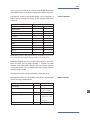
parameters will be stored in the preset:
Sound(s)
Layer
Split
Split/Layer-Balance
Split point
Octave Upper / Lower
Pedal-assigns
Effect(s) - Mix / Amount
Effect assign(s)
Free Wheel
Velocity curve
Fixed Velocity value
To cancel store press Value+ (N).
Note: The presets P01 to P24 are factory presets which you can overwrite.
14
NUMA Piano by Studiologic®