1
INSTRUCTION SHEET
Thank you for selecting OMRON product. This sheet primarily describes precautions required in installing and
operating the product.
Before operating the product, read the sheet thoroughly to
acquire sufficient knowledge of the product. For your convenience, keep the sheet at your disposal.
TRACEABILITY INFORMATION:
Representative in EU:
Omron Europe B.V.
Wegalaan 67-69
2132 JD Hoofddorp,
The Netherlands
Manufacturer:
Omron Corporation,
Shiokoji Horikawa, Shimogyo-ku,
Kyoto 600-8530 JAPAN
Ayabe Factory
3-2 Narutani, Nakayama-cho,
Ayabe-shi, Kyoto 623-0105 JAPAN
The following notice applies only to products that carry the CE mark:
Notice:
This is a class A product. In residential areas it may cause radio
interference, in which case the user may be required to take adequate
measures to reduce interference.
© OMRON Corporation 2010 All Rights Reserved.
Japan
EU
Taiwan
Li-ion00
California regulations concerning perchlorate:
This product is a lithium battery that contains perchlorate,
which is regulated by the State of California. Please
comply with these regulations. For details see the
following URL:
www.dtsc.ca.gov/hazardouswaste/perchlorate/
SAFETY PRECAUTIONS
● Keys to Warning Symbols
WARNING
Indicates a potentially hazardous
situation which, if not avoided,
could result in death or serious
injury. Additionally, there may be
severe property damage.
● Warning Symbols
WARNING
The Touch Finder contains a lithium ion
battery. There is danger of severe injury
due to fire, explosion, or combustion. Never
disassemble the Touch Finder, deform it by
pressure, or heat it to 100°C or higher.
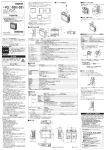
53.1
+
35.3
Battery for FQ-D31 Vision Sensor
11.4
T
−
6.15
FQ-BAT1
■ Dimensions
1. Loosen the screw on the battery cover of the Touch
Finder (FQ-D31), slide in the direction of the arrow,
and open the battery cover. (Torque: 0.15 N·m or less)
2. Insert the battery.
7.1
Model
■ Insertion procedure
29.4
Precautions for Safe Use
To use this product safely, observe the rules below.
1. Do not short the + and - terminals of the battery.
2. Do not use in a location where there is flammable or
explosive gas.
3. Do not use in an environment that exceeds the
operating temperature range of the product.
4. If used at a temperature that exceeds the operating range,
the protective device may activate and prevent charging.
5. Do not subject this product to shock.
6. Do not connect this product directly to a power supply
or car cigarette lighter socket.
7. Do not use in combination with other types of batteries.
8. Do not attempt to disassemble, repair, or modify this
product.
9. When disposing of the product, treat as industrial waste.
Precautions for Correct Use
Observe the following to prevent product failure,
malfunctioning, and adverse effects on performance and
functionality.
1. Do not use or charge this product with other than the
specified products.
2. Do not charge this product with other than the
specified AC adapter.
3. Do not use thinner, acetone, or kerosene to clean this
product.
4. When using the device, the battery cover screw must
be tightened.
2.8
(Unit: mm)
3. Slide the battery cover in the direction of the arrow and
tighten the screw on the battery cover.
Suitability for Use
■ Ratings/Performance
Item
Battery type
Nominal
capacity
Rated voltage
Dimensions
Ambient
temperature
range
Ambient humidity
range
Charging
method
Charging time*1
Usage time*1
Battery backup
life*2
Weight
THE PRODUCTS CONTAINED IN THIS SHEET ARE NOT SAFETY RATED.
THEY ARE NOT DESIGNED OR RATED FOR ENSURING SAFETY OF
PERSONS, AND SHOULD NOT BE RELIED UPON AS A SAFETY
COMPONENT OR PROTECTIVE DEVICE FOR SUCH PURPOSES.
Please refer to separate catalogs for OMRON's safety rated products.
FQ-BAT1
Secondary lithium ion battery
1,800 mAh
3.7 V
35.3 × 53.1 × 11.4 mm
Operating: 0 to 40°C
Storage: −25 to 65°C
(with no icing or condensation)
Operating and storage: 35% to 85%
(with no condensation)
Charged in Touch Finder
(FQ-D31).
2 hours
1.5 hours
300 charging cycles
OMRON shall not be responsible for conformity with any standards, codes, or
regulations that apply to the combination of the products in the customer's
application or use of the product.
■ Charging procedure
To charge this product, insert in the Touch Finder (FQ-D31)
and connect to the AC adapter (FQ-AC□).
1. Insert the product in the Touch Finder (FQ-D31).
2. Connect the AC adapter (FQ-AC□) to the Touch
Finder (FQ-D31). The CHARGE LED on the Touch
Finder (FQ-D31) will light. When charging is finished,
the CHARGE LED will turn off.
50 g max.
*1 This value is only a guideline. No guarantee is
implied. The value will be affected by operating
conditions.
*2 This is a guideline for the time required for the
capacity of the Battery to be reduced to 60% of
the initial capacity. No guarantee is implied. The
value will be affected by the operating
environment and operating conditions.
CHARGE LED
Take all necessary steps to determine the suitability of the product for the
systems, machines, and equipment with which it will be used.
Know and observe all prohibitions of use applicable to this product.
NEVER USE THE PRODUCTS FOR AN APPLICATION INVOLVING
SERIOUS RISK TO LIFE OR PROPERTY WITHOUT ENSURING THAT THE
SYSTEM AS A WHOLE HAS BEEN DESIGNED TO ADDRESS THE RISKS,
AND THAT THE OMRON PRODUCT IS PROPERLY RATED AND
INSTALLED FOR THE INTENDED USE WITHIN THE OVERALL
EQUIPMENT OR SYSTEM.
See also Product catalog for Warranty and Limitation of Liability.
EUROPE
OMRON EUROPE B.V. Sensor Business Unit
Carl-Benz Str.4, D-71154 Nufringen Germany
Phone:49-7032-811-0 Fax: 49-7032-811-199
NORTH AMERICA
OMRON ELECTRONICS LLC
One Commerce Drive Schaumburg,IL 60173-5302 U.S.A.
Phone:1-847-843-7900 Fax : 1-847-843-7787
ASIA-PACIFIC
OMRON ASIA PACIFIC PTE. LTD.
No. 438A Alexandra Road #05-05-08(Lobby 2),
Alexandra Technopark, Singapore 119967
Phone : 65-6835-3011 Fax :65-6835-2711
CHINA
OMRON(CHINA) CO., LTD.
Room 2211, Bank of China Tower,
200 Yin Cheng Zhong Road,
PuDong New Area, Shanghai, 200120, China
Phone : 86-21-5037-2222 Fax :86-21-5037-2200
OMRON Corporation
o O C T, 2 0 0 9