1
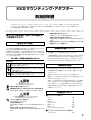
KKS Mounting Adapters
Owner’s manual
Thank you for purchasing the Korg MA-T rack tray (Mounting Adapter - Tray) and/or MA-L locking support (Mounting Adapter - Locking support). These product will allow you to take full advantage of the
Korg Komponent System (KKS) to customize your instrument(s). To ensure trouble-free enjoyment,
please read this owner’s manual carefully and use the product only as directed. Please retain this
manual for future reference.
○ ○ ○ ○ ○ ○ ○ ○ ○ ○ ○ ○ ○ ○ ○ ○ ○ ○ ○ ○ ○ ○ ○ ○ ○ ○ ○ ○ ○ ○ ○ ○ ○ ○ ○ ○ ○ ○ ○ ○ ○ ○ ○ ○ ○ ○ ○ ○ ○ ○ ○ ○ ○ ○ ○ ○ ○ ○ ○ ○ ○ ○ ○
Precautions
Cautions for use
Location
Using the unit in the following locations can result in a malfunction.
• In direct sunlight
• Locations of extreme temperature or humidity
• Excessively dusty or dirty locations
• Locations of excessive vibration
• Close to magnetic fields
To ensure that all steps are performed safely, please observe
the following points.
Handling
To avoid breakage, do not apply excessive force to the switches
or controls.
Care
If the exterior becomes dirty, wipe it with a clean, dry cloth.
Do not use liquid cleaners such as benzene or thinner, or cleaning compounds or flammable polishes.
Keep this manual
After reading this manual, please keep it for later reference.
Keeping foreign matter out of your equipment
Never set any container with liquid in it near this equipment.
If liquid gets into the equipment, it could cause a breakdown,
fire, or electrical shock. Be careful not to let metal objects get
into the equipment.
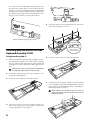
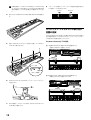
• Perform all steps in the order specified, taking care
that you use the correct parts in the correct orientation.
• You will need a Phillips (+) screwdriver with a
number 2 tip.
• When attaching or removing the sound generator
module, take care not to pinch your hand.
• Before connecting or disconnecting the cables, make
sure that the power of the sound generator module
is turned off. Plugging or unplugging cables with
the power on may cause the sound generator module to malfunction.
• Before using this product, be sure to read “Safety
cautions.”
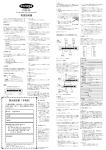
Included items
Rack Tray (MA-T)
About this manual
• This owner’s manual refers to the RADIAS sound
module as the RADIAS-R; and the M3 sound module as the M3-M.
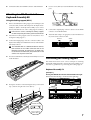
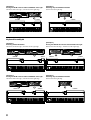
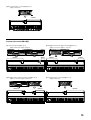
• This owner’s manual explains how to attach the
RADIAS-R to the Keyboard Assembly 61, how to
attach both the RADIAS-R and the M3-M to the
Keyboard Assembly 73/88, and how to attach two
M3-M modules to the Keyboard Assembly 88.
2
Lifting handle
Double-sided tape
Connection cable
Screws (M5 x 12)
Insulating washers
Insulating bushings
Module fastening screw (M3 x 8)
1
1
1
4
4
4
1
Locking support (MA-L)
Screws (M4 x 6)
2