1
Troubleshooting Guide
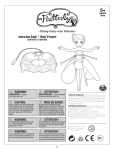
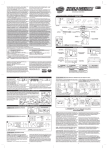
BATTERY REMOVAL AND INSTALLATION INSTRUCTIONS
1
1
Open the battery door with a philips screwdriver (not
included).
2
If used or spent batteries are present, remove these
batteries from the unit by pulling up on one end of each
battery. Install 6 new AA (LR6) alkaline batteries (not
included) as shown in the polarity diagram (+/-) inside
the battery compartment. Do not use a metal tool to
remove the batteries.
Problem
Remedy
Fairy flies too high
Fairy gets stuck on the ceiling
1. Press the launch button one time for a slow decent / press twice and the
fairy will turn off and fall to the floor.
2. Try resetting the fairy by turning both the fairy and the base OFF and ON.
3. Avoid flying near bright lights, infrared devises (TV remote controller, gaming
controller, etc.), open vents and/or fans, as these may overpower the fairy
and make it difficult to control.
Fairy does not hold a charge
Fairy does not lift properly
1. Make sure your fairy is fully charged.
Charging = Fairy OFF, base ON, status light flashing.
2. Check that the wings can move freely.
3. Check to make sure that her wings and rotors are
free of dirt or debris.
4. Ensure that she is standing straight in her base and
that the post she stands on is not bent.
5. Check the batteries, make sure you are using
brand name alkaline batteries for best performance
and that they are placed correctly (check polarity).
3
Replace battery door securely. Check your local laws
and regulations for correct recycling and/or battery
disposal.
Battery Safety Information:
Requires 6 X1.5V AA (LR6) alkaline batteries (NOT
INCLUDED).
Batteries are small objects.
Replacement of batteries must be done by adults.
Follow the polarity (+/-) diagram in the battery compartment.
Promptly remove dead batteries from the toy.
Dispose of used batteries properly.
Remove batteries for prolonged storage.
Only batteries of the same or equivalent type as
recommended are to be used.
• DO NOT incinerate used batteries.
• DO NOT dispose of batteries in fire, as batteries may
explode or leak.
• DO NOT mix old and new batteries or types of batteries
(i.e. alkaline/standard).
• DO NOT use rechargeable batteries.
• DO NOT recharge non-rechargeable batteries.
• DO NOT short-circuit the supply terminals.
Product Battery Removal Instructions:
Internal battery is factory installed, product disassembly and
battery removal must be performed by an adult. Do not puncture,
cut, tear, compress or deform product during disassembly. Ensure
product is turned off, then use a screw driver to remove all screws.
Separate product body halves to expose internal electronics. When
battery is visible in its entirety use scissors to cut a single battery
wire, immediately wrap the cut wire end with tape to isolate it,
repeat until all battery wires are cut and isolated, and the battery is
free from the rest of the product. Dispose of battery in accordance
with your local battery recycling or disposal laws. NOTE: Opening
of product and/or removal of battery will render product inoperative
and voids manufacturer warranties, dispose of remaining product
components in accordance with local laws.
Trouble Shooting:
If normal function of the product is disturbed or interrupted, strong
electro-magnetic interference may be causing the issue. To reset
product, turn it completely off, then turn it back on. If normal
operation does not resume, move the product to another location
and try again. To ensure normal performance, change the batteries,
as low batteries may not allow full function.
2
LiPo BATTERY INSTRUCTIONS
• Contains 1 x 3.7V LiPo battery pack. • Never charge
battery unattended. • Charge battery in isolated area. Keep away
from flammable materials. • Do not expose to direct sunlight.
• There is a risk of the batteries exploding, overheating, or igniting.
Do not disassemble, modify heat, or short-circuit the batteries. Do
not place them in fires or leave them in hot places. • Do not drop
or subject to strong impacts. • Do not allow the batteries to get
wet. • Only charge the batteries with the specified Spin Master™
battery charger. • Only use the batteries in the device specified by
Spin Master™. • Carefully read the instruction guide, and use the
batteries correctly. • In the unlikely event of leakage or explosion
use sand or a chemical fire extinguisher for the battery.
• Batteries must be recycled or disposed of properly.
Contains 1 x 3.7V LiPo battery pack. Requires 6
x 1.5V AA (LR6) alkaline batteries (not included).
Batteries
or battery packs must be recycled or disposed of
properly. When this product has reached the end
of its useful life it should not be disposed of with
other household waste. The Waste Electrical and Electronic
Equipment Regulations require it to be separately collected
so that it can be treated using the best available recovery and
recycling techniques. This will minimize the impact on the
environment and human health from soil and water
contamination by any hazardous substances, decrease the
resources required to make new products and avoid using
up landfill space. Please do your part by keeping this product
out of the municipal waste stream! The “wheelie bin” symbol
means that it should be collected as “waste electrical and
electronic equipment”. You can return an old product to your
retailer when you buy a similar new one. For other options,
please contact your local council.
This product complies with Part 15 of the FCC rules. Operation is subject to the following two conditions:
(1) This device may not cause harmful interference, and
(2) This device must accept any interference received, including interference that may cause undesirable operation.
This equipment has been tested and found to comply with the limits for Class B digital devices to Part 15 of the FCC rules. These limits are
designed to provide reasonable protection against harmful interference to radio communications. This equipment generates, uses and can
radiate radio frequency energy and, if not installed and used in accordance with the instruction, may cause harmful interference to radio
communication. If this toy does cause interference to radio or television reception (you can check this by turning the toy off and on while
listening for the interference), one or more of the following measures may be useful: • Reorient or relocate the receiving antenna • Increase
the separation between the toy and the radio or the TV • Consult the dealer or an experienced TV-radio technician for help.
NOTE: Changes, adjustments or modifications to this unit, including but not limited to, replacement of any transmitter component (crystal,
semiconductor, etc) could result in a violation of FCC rules under part 15 and/or 95 and must be expressly approved by Spin Master Ltd or
they could void the user’s authority to operate the equipment.
CAN ICES-3 (B)/NMB-3(B)
2
Fairy hits a wall and stops
working
Fairy wings fell off
4
1. Make sure all the wings are attached to the fairy and move freely
2. Reset the fairy by turning it OFF and ON.
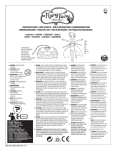
1) Slide top cylinder into hook.
2) Gently squeeze wing and slide bottom
cylinder into hook.
For additional “TROUBLESHOOTING” questions and solutions, please visit our website:
www.flutterbye.com
7