1
BOX CONTENTS
•
EIE
•
USB cable
•
Software CD
•
Quickstart Guide
•
Power adapter
•
Safety Instructions & Warranty Information Booklet
SYSTEM REQUIREMENTS
Minimum PC Requirements:
• Pentium III 450 MHz Processor
• 128 MB RAM
• Available USB 1.1 Port
• Windows XP (with Service Pack 2 installed)
Minimum Macintosh Requirements:
• Any Apple computer with native USB support
• 128 MB RAM
• Available USB 1.1 Port
• Mac OS X "Jaguar" version 10.2 or later
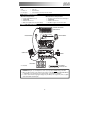
CONNECTION DIAGRAM
ASSIGNMENT DATA ENTRY
VELOCITY
AFTER
TOUCH
REVERB
DEPTH
VOLUME
NUMERIC KEYPAD
TRANSPOSE
CC
NOTE
RESET
MIDI
CHANNEL
CC
DATA
CC
NO.
PROGRAM
1
2
3
4
5
6
7
8
9
0
CANCEL
ENTER
DATA ENTRY
DOWN
MIDI / SELECT
UP
OCTAVE
PITCH
MODULATION
USB-MIDI KEYBOARD
CONTROLLER*
GUITAR*
MICROPHONE*
HEADPHONES*
COMPUTER*
POWER
SPEAKERS*
EXTERNAL
EFFECTS UNIT*
* not included.
• WARNING: Only put on your headphones or turn on your speakers AFTER turning on the EIE.
• When recording a guitar or bass with an active pickup, set the EIE's GUITAR / MIC/LINE SWITCH
to "MIC/LINE." If your instrument uses a passive pickup, set the switch to "GUITAR."
• To reduce electrical hum at high gain settings, keep the EIE's power supply away from your guitar
cable and the EIE's channel inputs.
3