1
Thank you for buying Pioneer’s product.
Please read through the Operating Instructions to learn how
to operate your model safely and properly.
Please be advised to keep the Operating Instructions in your
place for future reference.
Installation
• Consult your dealer if you encounter any difficulties with
this installation.
• Pioneer is not liable for any damage resulting from
improper installation, improper use, modification, or
natural disasters.
IMPORTANT NOTICE
Record the model number and serial number of this
equipment below.
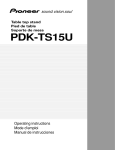
Model No. PDK-1016
Serial No.
Keep these numbers for future use.
Contents
Cautions ...................................................................... 2
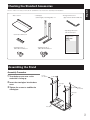
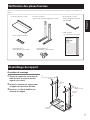
Checking the Standard Accessories ......................... 3
Assembling the Stand ............................................... 3
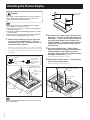
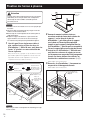
Attaching the Plasma Display ................................... 4
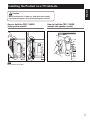
Installing the Product on a TV table etc. ................. 5
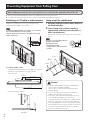
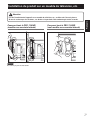
Preventing Equipment from Falling Over ................ 6
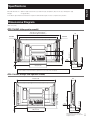
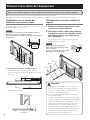
Specifications ............................................................. 7
Dimensions Diagram ................................................. 7
CAUTION
This symbol refers to a hazard or unsafe practice which
can result in personal injury or property damage.
2
En
Cautions
This product is a table top stand exclusively designed for
Plasma Display (PRO-1140HD) from Pioneer. Use with other
model is capable of resulting in instability causing possible
injury. For further information, please contact the store where
you purchased your display.
Do not install or modify the product other than specified. Do
not use this stand for a Plasma Display other than those
designated and do not modify it or use it for other purposes.
Improper installation is extremely dangerous because it may
result in it falling over or other accident.
Installation Location
• Select a location that is strong enough to support the
weight of the stand and the displays.
• Make sure to place it in a level and stable location.
• Do not install it outdoors, at a hot spring, or near a beach.
• Do not install the stand where it may be subjected to
vibration or shock.
Assembling and Installation
• Assemble the stand in accordance with the assembly
instructions and securely attach all screws at the
designated locations.
There have been cases where unforeseen accidents
such as the equipment breaking or falling over occurred after the installation of the display because the
stand was not installed as instructed.
• The display must always be installed by two or more
people to assure it is installed safely.
• Before installation, turn off the power for the display
and peripheral devices then remove the power cord
plug from the power outlet.
Prevent accidents caused by the product falling over by taking
reliable measures to prevent it from falling over (see Page 6).