1
Hot water
To prepare tea or instant beverages, you can prepare hot water with an optimal
temperature.
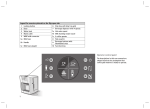
1. Turn the adjusting knob (10) to the position for hot water (B).
2. Place an appropriate container on the grate insert (1) (see figure).
3. Wait until the On / Off button (4) illuminates white.
4. Depending on the size of the container, press the corresponding start button
(3) or
(5). The On / Off button (4) illuminates white during preparation.
The volume of hot water may vary from the usual amount of coffee. For
this reason, monitor the filling procedure.
5. You can cancel it at any time by pressing the start button again.
6. Turn the adjusting knob (10) back to the home position (C) as soon as no
more liquid is being dispensed.
WMF Eco Energy
Your coffee pad machine is equipped with several functions which reduce energy
consumption.
ECO brew
If you intend to switch off the appliance after making a beverage of your choice,
you can choose to activate eco-brewing when you begin. This avoids reheating
the coffee unnecessarily.
To start eco-brewing, press the start button and the On/Off button (4) briefly at
the same time. The On / Off button (4) illuminates white during the preparation
as usual, but the red flashing indicates the subsequent switch off.
Standby
If the appliance is no longer used for about 5 minutes, sleep mode will be activated automatically. The On / Off button (4) then slowly flashes red. To restore
the ready state, press any start button.
Automatic switch-off
If the appliance is not used for about 30 minutes, it is automatically switched to
the off mode In this mode, the power consumption is less than 0.5 Watts.
28