1
ATTENTION : Ne pas laisser un enfant manger ou boire pendant qu’il joue avec ce
produit, afin d’éviter les risques d’étouffement.
ATTENTION : Régulièrement vérifier que ce jouet est en bon état et qu’il ne pose
pas de danger. Dans le cas contraire (par exemple, s’il est cassé à certains endroits),
tenez ce jouet hors de portée des enfants.
Sécurité relative aux piles
Les piles sont des objets de petite taille. Le remplacement des piles doit être effectué par
un adulte. Respectez le schéma de polarité (+ / -) reproduit dans le compartiment des
piles. Enlevez rapidement les piles usagées pour éviter les fuites. Suivez les procédures
adéquates pour vous débarrassé des piles usagées. Retirez les piles en cas de non-usage
prolongé. Utilisez uniquement des piles ou accumulateurs du type recommandé ou d’un
type équivalent. Les piles incluses dans les produits lors de l’achat sont uniquement
destinées aux démonstrations en magasin et doivent être remplacées pour améliorer les
performances du produit.
NE PAS incinérer les piles usagées.
NE PAS jeter les piles au feu car elles peuvent exploser ou fuir.
NE PAS mélanger piles usagées et piles neuves, ni différents types de piles (c’est-à-dire
alcalines/standard).
NE PAS court-circuiter les terminaux d’alimentation.
NE PAS recharger des piles non rechargeables.
• Le rechargement des piles rechargeables doit être effectué sous la supervision d’un adulte.
• Les piles rechargeables doivent être retirées du contrôleur d’être chargées.
Exposure to Radio Frequency Energy
The LEAPTV™ Transforming Controller contains a radio transmitter and receiver. When
powered ON, the system sends and receives radio frequency (RF) energy through its
internal antenna.
The transforming controller has been tested and found to meet the SAR exposure
requirements for Wi-Fi operation as established by FCC, IC, and European Union guidelines.
The controller has been tested when positioned at 0 mm from the body, without any metal
parts in the vicinity and when properly used with the LEAPTV console.
This equipment generates, uses and can radiate radio frequency energy and, if not installed
and used in accordance with the instructions, may cause harmful interference to radio
communications. However, there is no guarantee that interference will not occur in a particular
installation. If this equipment does cause harmful interference to radio or television reception,
which can be determined by turning the equipment off and on, the user is encouraged to try to
correct the interference by one or more of the following measures:
• Reorient or relocate the receiving antenna.
• Increase the separation between the equipment and receiver.
• Consult the dealer or an experienced radio/TV technician for help.
Note: Changes or modifications to this unit not expressly approved by LeapFrog could void
the EMC and wireless compliance and void the user’s authority to operate the equipment.
This product demonstrated EMC compliance using compliant peripheral devices and
shielded cables between system components. It is important that you use compliant
peripheral devices and shielded cables to reduce the possibility of causing interference to
radios, televisions, and other electronic devices.
Canadian Compliance This Class B digital apparatus complies with Canadian ICES-003.
CAN ICES-3(B)/NMB-3(B). Cet appareil numérique de la classe B est conforme à la norme
ICES-003 du Canada. CAN ICES-3(B)/NMB-3(B).
European Community Compliance Statement The equipment complies with the RF
Exposure Requirement 1999/519/EC, Council Recommendation of 12 July 1999 on the
limitation of exposure of the general public to electromagnetic fields (0–300 GHz). This
wireless device complies with the R&TTE Directive.
EU Declaration of Conformity LeapFrog Enterprises, Inc. hereby declares that this Wi-Fi
device is in compliance with the essential requirements and other relevant provisions of
Directive 1999/5/EC.
Environmental Phenomena The unit may malfunction if subjected to radio-frequency
interference. It should revert to normal operation when the interference stops. If not, it may
become necessary to turn the power OFF and then back ON. In the unlikely event of an
electrostatic discharge, the unit may malfunction and lose memory, requiring the user to
reset the device by turning the power OFF and then back ON.
Recycling For information on how this product might be recycled, visit leapfrog.com/recycle
or call (800) 701-5327.
TM & © 2014 LeapFrog Enterprises, Inc. All rights reserved.
leapfrog.com
Certification and Compliance
FCC Compliance Statement
This device complies with part 15 of the FCC rules. Operation is subject to the following two
conditions: (1) this device may not cause harmful interference, and (2) this device must
accept any interference received, including interference that may cause undesired operation.
Note: This equipment has been tested and found to comply with the limits for a Class B
digital device, pursuant to part 15 of the FCC Rules.
These limits are designed to provide reasonable protection against harmful interference in
a residential installation.
This transmitter must not be co-located or operated in conjunction with any other antenna
or transmitter.
Contains FCC ID: QDX31704
Recommended for children ages 3-8 years.
Convient aux enfants de 3 à 8 ans.
Model: LEAPTV™ Model: 31704
LeapFrog Enterprises, Inc.
6401 Hollis Street, Suite 100
Emeryville, CA 94608
(800) 701-LEAP (5327)
Item number: 31704
Part number: 605-12218-B
Transforming Controller
Parent Guide & Instructions
Guide des parents et mode d’emploi
This guide contains important information. Please keep it for future reference. Ce guide
contient des informations importantes. Veuillez le conserver pour toute référence future.
Getting Started / Pour commencer
Please read all Operating and Important Safety Instructions before using the LEAPTV™
Transforming Controller. Failure to follow Safety Instructions could result in injury or
damage to the LEAPTV Transforming Controller, LEAPTV System or other property.
Veuillez lire le Mode d’emploi ainsi que les instructions de sécurité avant d’utiliser la
manette de jeu modulable LEAPTV. Le non-respect des instructions de sécurité peut
entrainer des dommages à la manette LEAPTV, au système LEAPTV ou à d’autres
composants.
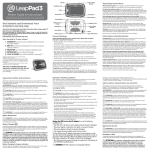
What’s Included / Inclus : Controller, Wrist Strap / La manette de jeu et la dragonne.
Add an Additional Controller / Ajouter une manette de jeu supplémentaire
1. Insert two AA batteries (not included). When
Console
the batteries are inserted, the light on the end
of the controller will glow green in color.
2.Power on your TV and the LeapTV console
Power Button
and wait for it to display the Home Page.
Bouton d’alimentation
3.On the controller, simultaneously
Power Light
Témoin d’alimentation
press the Home & Hint buttons (
)
for three seconds.
Cartridge Slot
Fente pour la cartouche
4. After the light on the end of the controller
)
turns blue, press the SYNC button (
Sync Button
To add additional controllers
located below the cartridge slot on
the console
Bouton Sync
Pour ajouter de
5.When the light turns magenta in color, your
nouvelles manettes
controller is paired to the console.
Front
Face avant
Model: 31704
CANADA:
Model 31704 Contains IC: 4810A-31704 CAN ICES-3(B)/NMB-3(B)
E.U.
1. Insérez 2 piles AA (non incluses). Quand les piles sont insérées, la lumière au bout de la
manette deviendra verte.
2. Allumez votre téléviseur et votre console LeapTV puis attendez de voir l’écran principal.
3. Appuyez sur le bouton Écran principal et Aide en même temps pendant 3 secondes.
4.Quand la lumière au bout de la manette devient bleu, appuyez sur le bouton SYNC situé
en dessous de la fente pour la cartouche.
5.Quand la lumière devient magenta, la manette est connectée à la console.