1
4.Hardware Installation
Before continuing with the hardware installation, please disable any antivirus software.
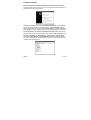
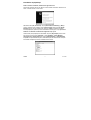
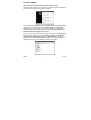
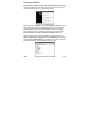
Connect the capture unit with a USB 2.0 port on your computer and insert the CD-ROM into your
CD-ROM drive. Following wizard will pop up:
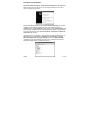
Select [No, not this time] first and select [Install software automatically] next. Click [Next] and
follow the instructions in the wizard to finish the installation. (A [Syntek STK1150] window may
appear during installation process, please click [Continue anyway].) Complete the installation by
clicking [Finish]. If any further components are found, please repeat the above process until the
[Found new hardware: Your hardware is installed and configured for use] window appears.
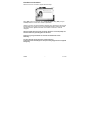
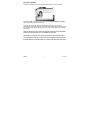
Next, check that the drivers have been installed correctly. Right click on [My Computer] and click
[Properties] > [Hardware] tab > [Device Manager] > [Imaging Devices]. [Imaging Devices]
should contain [Syntek STK1150]. (If [Syntek STK1150] is preceded by a yellow exclamation
mark, please remove the driver, disconnect the capture unit from your computer and repeat the
installation process described above.
PCUSBVC
3
VELLEMAN