1
Üzembehelyezés
Start
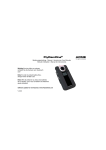
Helyezzünk be egy megfelelõ SDkártyát a FlyCamOne2 SD foglalatába [10]. Csúsztassuk a kapcsolót [1]
„ON“ állásba,majd nyomjuk meg a
rögzítõ gombot [2]; a kijelzõn meg“ ( „Ready“= készenjelenik a „
lét) felirat. A mód váltó gomb [3]
megnyomásával kiválaszthatjuk a
rögzítés módját. A rögzítõ gomb
megnyomásával [2] elindíthatjuk,
illetve megállíthatjuk a felvételt.
A felvétel automatikusan leáll, ha
megtelik az SD-kártya memóriája.
Weblap: www.FlyCamOne.com
Frissítések és egyéb információk.
Put a suitable SD-Card into the SDCard slot of the FlyCamOne2
(FCO2).. Slide the switch [1] to
position “ON” and press the shutter
button [2]; on the display appears
” for ready. Choose your mode
“
by pressing the mode button [3]
Start and stop each time by
pressing the shutter button [2]. Find
details for external shutter release
at www.FlyCamOne.com –>
support.
The recording stops by itself when
the SD-card is full.
Adatok kiolvasása
Readout of data
Inizio con FCO2
Mise en route de la FCO2
Mettere una scheda SD nella
fessura del FCO2.. l'interruttore [1]
posizionare "in alto"; sul Video
" per pronto. Inizia e
appare "
ferma registrazione pigiando il
bottone di impostazione [2]
osservare lo stato sul display [4].
La registrazione video si ferma da
sola quando la scheda SD è piena.
Insérez d’abord une carte SD
compatible dans le lecteur de carte
de la FCO2. Mettez l’interrupteur [1]
en position “ON” et appuyez sur le
bouton[2] ; l’écran indique
” pour « ready » : la
maintenant “
caméra est prête. Vous pouvez
maintenant déclencher et arrêter la
prise de vue en appuyant sur le
bouton de déclenchement [2] ou
alors en connectant directement la
caméra à la platine pour un
déclenchement externe.
Pour plus de détails sur le
déclenchement à distance rendez
vous sur www.FlyCamOne.com
Scarico video
Transfert des données
Collega il FCO² con cavo USB al pc.
Attendere la lettura del FCO² ed evitare
di collegare altre schede. E' possibile
collegare direttamente la SD card ad un
lettore schede del PC.
Choisissez le mode „
“ et
connectez la FCO2 à votre
ordinateur à l’aide du câble fourni.
La FCO2 sera reconnue comme un
disque amovible par votre
ordinateur.
Vous pouvez également extraire la
carte SD située dans votre FCO2 et
la placer directement dans le lecteur
de carte de votre ordinateur si celuici en est équipé.
A PC-re csatlakoztatás a
készülékhez mellékelt USB kábel
segítségével történhet. A számítógépen egy külön meghajtóként
jelenik meg a FlyCamOne2 (FCO2) .
Természetesen kártyaolvasóhoz is
csatlakoztathatjuk a készülékben
lévõ SD kártyát, így közvetlen arról
is lementhetjük az adatokat.
Choose „
“ and connect the FCO²
with the supplied USB-cable and
your PC.
The FCO² will be displayed as a
single drive. Attend that network
drives can interfere the FCO² drive.
Cut the network drives. Of course
you can connect the SD-card
directly to your pc card reader.
A készülék töltése 2
Charge the FCO2
Caricare FCO2
Charge
A töltés a mellékelt USB kábel segítségével a számítógépen keresztül történik. A töltési idõ kb. 3 órát
vesz igénybe.
The charging starts on its own by
connecting the FCO² with the PC. It
will take approximately 3 hours to
charge the FCO².
La carica del FCO può essere fatta
durante il collegamento al PC, il
dspaly segnala "PC".
Per completare la carica del FCO ci
vogliono 3 ore.
La charge de votre FCO 2 débutera
automatiquement une fois qu’elle
sera connectée à votre ordinateur.
L’écran LCD indiquera alors “PC”.
La durée moyenne de la charge