1
RIP CUT
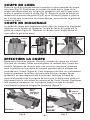
Place the tile at the front edge against the front stop (Fig. 3). Position
the tile so the line of cut is directly over the scoring line, which is the
line between the left and right pad (Fig. 4). Adjust the cutting guide
by loosening the guide knob (Fig. 4) and sliding it left or right to the
desired cutting position, and lock the cutting guide in place.
DIAGONAL CUT
The cutting guide can also assist in diagonal cuts. Push the button and
loosen the angle guide lever on the cutting guide (Fig. 5). Move tile into
the desired angle and lock guide in place.
RIP CUT
Guide
knob
Scoring
line
DIAGONAL
CUT
Angle
guide
lever
Stop
Fig. 3
Fig. 5
Fig. 4
MAKING THE CUT
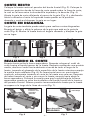
Flip the Breaker Bar up. Then place the cutting wheel on the rear edge
of the tile. Then, while applying medium pressure, slide the wheel
forward the full length of the tile, scoring the tile surface glaze as the
handle is pushed forward (Fig 6). It is important to make one continuous
motion, scoring the surface only once per tile. After scoring, and
without moving the tile, flip the breaker bar down. Position the handle
so that the breaker foot is slightly in from the front edge of the tile and
front stop. Apply increasing pressure on the handle until the tile snaps
along the score line (Fig 7).
Press
down
Slide to
score
surface
glaze
Breaker Bar
SCORING
SNAPPING
Fig. 6
Fig. 7
-3-