1
USAGE with MODE 1 (VISUAL SYSTEM)
MODE 1: ADJUSTING GROUND SETTING
Turn the On/Off button to the Mode 1 position; when the device is On, the Ground Setting screen
will appear automatically. For the most accurate results, begin by checking and setting your
SENSITIVITY adjustment. The Sensitivity level recommended for new users is 8.
40 cm
3 cm
Reset
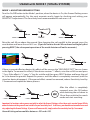
Raise the coil 40 cm above the ground. Now, keeping the coil parallel to the ground, press the
reset button and lower the coil to 3 cm. (If you fail to raise the coil 40 cm above and begin by first
pressing RESET, the subsequent operation of the metal detector will not be accurate.)
or
40 cm
Reset
3 cm
If there is ground effect on device, this effect will be seen on the “GROUND EFFECT” bars as shown
in the figure. To remove this effect, If the device receives “-” effects, raise the coil 40 cm and press
“-” key; if the effect is “+”, press “+” key for a while and then press RESET button and lower the coil
to 3 cm above the ground. Repeat this process until the effect is completely removed (until the
signal on device disappears). If the ground effect cannot be removed, reduce Sensitivity Level by
1 increment and repeat the above process.
3 cm
10 cm
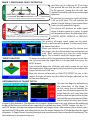
After the effect is completely
removed, press the OK button
while lowering the coil down to
10 cm. Now switch to the search
mode and start searching.
Important: In locations where you are not able to adjust the Ground Settings, either there exists a metal target OR the
mineral structure in the ground is not suitable for your sensitivity level. In this case, you should move to another area and
retry adjusting the Ground Settings. If you are still unsuccessful, simply reduce the sensitivity level by 1 increment.
Ground Setting value would be between -201 and +201.