1
INSTALLATION MANUAL
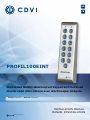
PROFIL100EINT
Illuminated Mullion Weatherproof Keypad Self Contained
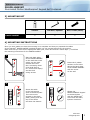
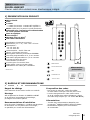
3] MOUNTING KIT
PROFIL100EINT
Varistor
T20 Diax® Spanner
Diax® screws (M5x8)
1
1
1
4] MOUNTING INSTRUCTIONS
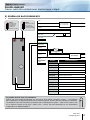
Once you have made sure that the mounting kit is complete and that you prepared the cables
of the Digicode® PROFIL100EINT encoded keypad, you can proceed and mount the product.
Make sure that you have all the appropriate tools (drill, screw drivers and a meter tape...) and follow
the mounting instructions for the PROFIL100EINT.
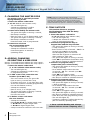
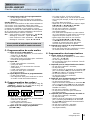
1
Place the back plate
of the PROFIL100EINT
on the wall then mark
with a pen the hole
location then drill
the 2 mounting holes
(drill bit Ø 5mm a
nd 35mm hole depth)
and the hole
wiring access.
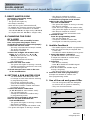
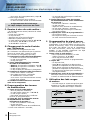
3
2
Insert the 2 plastic
anchors in the holes.
Mount the back plate
of the PROFIL100EINT
with the screw
on the wall.
4
Insert the cable
in the hole access
area of the back plate.
Then mount the
keypad on the back
plate, placing first the
top in the hooks
and then the bottom.
Fasten the
PROFIL100EINT keypad
to the back plate
with the M5x8 Diax®
screw and T20 Diax®
spanner hardware.
cdvi.com
cdvigroup.com
3