1
English
Insatallation
Step 1:
Remove the head unit from your dashboard.
Important: Depending on how your head unit was installed you may have to remove part or
all of your dash board before the head unit can be pulled out. You may also have to remove
screws to complete this step.
Note:Before proceeding, make sure that the PIA has been programmed. Refer to the PIA Installation Manual. Professional installation is recommended.
Step 2:
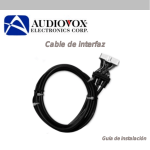
Connect the 34-pin cable connector to the Programmable Interface Adapter (PIA) mating
connector as shown in Fig. 1. Slide the rubber strain relief onto the PIA case. Attach the Car
Dock USB connector into the USB receptacle on the PIA. Make sure the connectors are
secure, and slide the top cover onto the bottom housing. (Refer to Fig. 2.)
Mini-Tuner and
Car Dock
Antenna
Yellow and
black wire are
optional, based
on model.
Mating
Connector
Connector
Yellow Wire,
Ground Wire
atter
Fuse
Note: Make sure all cables
are securely connected
Fig. 1 PIA Cable Interface