1
V0.0
MOV-040
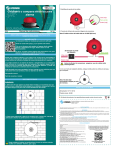
3. Open the camera application on your device.
4. Take a photograph to verify that the operation is correct by pressing the corresponding key
on the device connected (IOS or ANDROID).
era 36
am
0
C
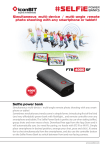
Selfie stick with bluetooth remote
IOS
android
Instruction manual
0215v
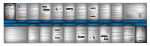
5. Open the expandable arms adapter and place your mobile device as shown in the picture.
Before using your new Steren product, read this instruction manual to prevent
any damage.
Verify that the device was firmly secured.
I M P O R TA N T
The information shown in this manual is for reference only
about the product. Because updates can be differences.
Please see our website (www.steren.com) to obtain the latest
version instructive.
“The operation of this equipment is subject to the following two
conditions: (1) it is possible that this equipment or device may not cause
harmful interference, and (2) this equipment or device must accept any
interference, including interference that may cause undesired in the
operation . “
CAUTIONS
0
IOS
The stick has 6 elements and it can reach a length of 1 meter, perfect size for
your pictures. It is very easy to install, just pair the remote control to your
Smartphone via Bluetooth, open the camera, aim the selfie stick, and take the
picture!
6. Carefully adjust the length of the telescopic tube according to your needs.
era 36
am
With this stick you can take all the selfies you want, load to the cloud and share
them with everyone. Don’t let any of your friends out of the picture or take a
photo of that amazing landscape without asking for help.
10 cm to 13 cm
android
HIGHLIGHTS
C
* Do not use in case of rain or thunderstorm.
* Be sure to pay attention to your surroundings while using the device, it could
be risky if there are near high voltage cables.
* Wipe with a clean cloth moistened with water do not use solvents.
Fully compatible with Android and iOS, and the remote control can be used
independently from the stick.
CONTENT
1. Rubber clamping
2. Expandable adapter
3. Clamping Knobs
4. Telescopic tube
5. Protective Case
6. Remote Control
7. On/off
8. Capture button
9. Indicator LED
S P E C I F I C AT I O N S
5
6
6
C
1
2
iOS and Android compatible
Light weight (128g)
Anti-slippery handle
Up to meter length
Remote control:
Input: 3 V- - - (1 x CR2032 battery)
Operating frequency: 2.4 GHz
Product design and specifications are subject to change without notice.
Product: Selfie stick with bluetooth remote
Part number: MOV-040
Brand: Steren
era 36
am
0
8
7. In iOS you can record video, pressing the iOS button on the remote control.
IOS
3
7
android
4
INSTRUCTIONS
1. Power the bluetooth remote control on, the LED blinks in blue.
2. Activate Bluetooth on your mobile device, make sure it is discoverable, the
remote control appears as “Steren MOV-040” in the device list then select it, the
LED will turn off.
WARRANTY
This Steren product is warranted under normal usage against defects in workmanship and materials to the original purchaser for one year from the
date of purchase and three months on its battery.
CONDITIONS
1. This warranty card with all the required information, invoice or purchase ticket, product box or package, and product, must be presented when
warranty service is required.
2. If the product is in the warranty time, the company will repair it free of charge.
3. The repairing time will not exceed 30 natural days, from the day the claim was received.
4. Steren sell parts, components, consumables and accessories to customer, as well as warranty service, at any of the addresses mentioned later.
THIS WARRANTY IS VOID IN THE NEXT CASES:
If the product has been damaged by an accident, acts of God, mishandling, leaky batteries, failure to follow enclosed instructions, improper repair by
unauthorized personnel, improper safe keeping, among others.
a) The consumer can also claim the warranty service in the purchase establishment.
b) If you lose the warranty card, we can reissue it, if you show the invoice or purchase ticket.
RETAILER INFORMATION
0
C
Name of the retailer ____________________________________ era 36
am
IOS
Address _____________________________________________
Product ______________________________________________ Brand _______________________________________________
Serial number _________________________________________
Date of delivery _______________________________________
android
In case your product fails or have questions, please contact your nearest dealer. If you are in Mexico, please call to our Call Center.
01 800 500 9000