1
ENGLISH
MM2000
Instruction Manual
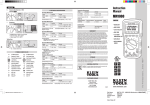
General Specifications
The Klein Tools MM2000 is a True RMS, auto-ranging multimeter.
It measures AC / DC voltage, low impedance voltage, AC / DC current,
resistance, capacitance, frequency, duty cycle, and temperature.
It can also test diodes and continuity.
•
•
•
•
•
•
•
•
•
•
•
•
Operating Altitude: 2000 m
Relative Humidity: < 75%
Operating Temperature: 0°C / 32°F to 40°C / 104°F
Storage Temperature: -20°C / -4°F to 60°C / 140°F < 80% R.H.
Accuracy Temperature: 18°C / 64°F to 28°C / 82°F
Temperature Coefficient: 0.1*(specified accuracy) / °C
Sampling Frequency: 3 samples per second
Dimensions: 7" x 3.5" x 1.875"
Weight: 14 oz.
Calibration: Accurate for one year
CAT Rating: CAT III 1000V, CAT IV 600V
Accuracy: ± (% of reading + # of least significant digits)
~
O.L.
MIN
AC Measurement
DC Measurement
Negative DC Value
AT
Overload: Range Exceeded
Apo Auto Power-Off Active
Low Battery
HOLD
Minimum Reading
MAX Maximum Reading
%
Duty Cycle Mode
V
Voltage Measurement
Auto Range Active
Hold Active
Frequency Mode
A
Current in Amps
LOW Ƶ Low Impedance Mode
Relative Reading
Ω
Resistance in Ohms
Diode Test
F
°F
n
m
M
Capacitance in Farads
Continuity Test
°C
µ
k
Degrees Fahrenheit
Nano 10-9
Milli 10-3
Degrees Celsius
Micro 10-6
Kilo 103
Mega 106
Feature Details
WARNINGS
To ensure safe operation and service of the tester, follow these instructions.
Failure to observe these warnings can result in severe injury or death.
• Before each use, verify meter operation by measuring
a known voltage or current.
• Never use the meter on a circuit with voltages that exceed the
category based rating of this meter.
• Do not use the meter during electrical storms, or in wet weather.
• Do not use the meter or test leads if they appear to be damaged.
• Ensure meter leads are fully seated, and keep fingers away from
the metal probe contacts when making measurements.
• Do not open the meter to replace batteries while the probes
are connected.
• Use caution when working with voltages above 60V DC,
or 25V AC RMS. Such voltages pose a shock hazard.
• To avoid false readings that can lead to electrical shock,
replace batteries if a low battery indicator appears.
• Unless measuring voltage or current, shut off and lock out
power before measuring resistance or capacitance.
• Always adhere to local and national safety codes. Use individual
protective equipment to prevent shock and arc blast injury where
hazardous live conductors are exposed.
~
AC Alternating Current
DC Direct Current
L
J
D
MM2000
Apo
G
F
E
V
AT
0
REL
10
RANGE
SELECT
20
30
MAX/MIN
40
HOLD
Duty
H
L.
M.
I
DTEK
Low Z
M
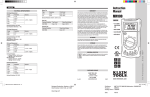
Auto Power-Off (Apo)
• Device will power off after 30 minutes non-use.
• Turn the dial or press a button to wake.
• Disabled during Max / Min function.
• Holding Select button while turning on disables Auto Power-Off
E. Select Functionality Button
• Switch between AC and DC.
, and .
• Switch between Ω , ,
• Switch between Hz and %.
• Switch between °F and °C.
F. Relative Reading Mode
• Press to store current value.
• Display will now show the difference between the
stored and live readings.
• Press again to return to live reading.
G. Auto / Manual Range
• Press repeatedly to cycle through manual ranges.
• Press for 2 seconds to return to auto ranging mode.
• AT is displayed on LCD only during auto ranging mode.
H. Max / Min Hold
• Press to enter Max / Min mode; the largest and smallest
values will be saved while in this mode.
• Press repeatedly to alternate between the maximum
and minimum readings.
• Press for 2 seconds to return to live reading and
clear the stored maximum and minimum values.
I.
Hold / Backlight
• Press to hold the current input on the display.
• Press again to return to live reading.
• Press for 2 seconds to enable / disable lights.
• Using lights drains the battery significantly.
J. K. Battery / Fuse Replacement
• When
indicator is displayed on the LCD,
batteries must be replaced.
• Remove rubber boot, back screw, and replace 2 x AAA batteries.
• This meter uses 440mA / 1000V and 11A / 1000V fast blow fuses.
ºF ºC
m
K
Magnetic Hanger Accessory (Optional, Sold Separately)
• Slide magnetic adapter into protective rubber boot.
• Attach instrument to metal for hands-free use.
Bar Graph
• The bar graph shows an approximate analog representation
of a measurement.
• The bar graph responds much faster than the digital display.
• The scale of the bar graph is zero to the maximum reading of
the selected range.
AC / DC Voltage: < 1000V, (LOW Ƶ): < 600V
Features: REL HOLD RANGE MAX/MIN
1.
DTEK
Duty
Duty
A
C
Temp
m
COM
4
Duty
DTEK
Double Insulated Class II
DC/AC Voltage or Current
Ground
AC Source
ºF ºC
m
m
COM
AC / DC Current (small): < 400mA
Features: REL HOLD RANGE MAX/MIN
3.
DTEK
Duty
Low Z
Low Z
ºF ºC
PRESS
ºF ºC
m
m
m
COM
• Attach red lead to “mAµA” input.
• Select µA or mA, and AC or DC current source.
4.
Resistance / Capacitance / Diode / Continuity
SELECT
Low Z
PRESS
TO SELECT
DTEK
Duty
ºF ºC
Resistance
Capacitance
Diode
Continuity
Low Z
ºF ºC
m
Resistance Features:
HOLD
RANGE
MAX/MIN
REL
•
Do not measure resistance
on a live circuit.
• Ω < 40MΩ
ºF ºC
m
Capacitance Features:
HOLD
• F < 4000µF
•
Safely discharge capacitor before measurement.
• Reading may take up to 60 seconds
for large capacitors.
COM
Low Z
ºF ºC
m
A. B. C. Use CAT III / CAT IV rated leads.
A. Do not attempt to measure more than 1000V.
A. Do not attempt to measure more than 600V on (LOW Ƶ) setting.
B. Do not attempt to measure more than 400mA.
C. Do not attempt to measure more than 10A.
Low Z
PRESS
• Start with this setting if current level is unknown.
• Attach red lead to “A” input.
• Select AC or DC current source.
3
1
ºF ºC
m
6
m
Warning or Caution
COM
Duty
Low Z
1
ºF ºC
m
•
DO NOT use (LOW Ƶ) mode at voltages greater than 600V.
• Use Low impedance (LOW Ƶ) mode to reduce ghost voltages.
AC / DC Current (large): < 10A
Features: REL HOLD RANGE MAX/MIN
2.
Low Z
DTEK
Low Z
ºF ºC
Low Z
m
COM
5
Low Z
PRESS
DTEK
Function Instructions
B
SYMBOLS
D.
Symbols used on LCD
Diode Features:
HOLD
2
COM
MIN/MAX
Display shows:
• Forward voltage drop if forward biased.
• “O.L.” if reverse biased.
MM2000-Instructions-139546TART.indd 5-8
4/6/10 10:19 AM
File Name:
Product: Packge Part#:
FINAL Date: Client Sign off:
MKT121707 - MM2000-Instructions-139546TART
MM2000
139546T
1/18/10