1
ENGLISH
OPERATION MANUAL
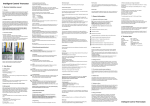
• Chase mode: the fader is used to select the chaser speed in a range from
0.1seconds to 2.5seconds.
• Spectrum mix mode: When you select the function “color fade” on the
spectrum mix fader(5), you can adjust the fade time between colors in a range
from 2.5seconds to 12seconds.
7. MASTER SLIDER: Used to adjust the overall light output of the iColor4. You obtain
maximum light out put when this fader is closed. The light is off when the fader is
up.
8. SOUND BUTTON: In chase mode, press this button to make the patterns move to
the rhythm of the music. The CA-32 has a built-in microphone so there’s no need
to connect an external music signal.
9. FULL ON BUTTON: At any time, even in blackout(10), you can use this button to
set all lamps of the iColor4 to maximum output. This produces a strong, white light.
10. BLACKOUT BUTTON: Used to set the iColor4 in blackout mode: when pressed
the lamps will slowly fade down to zero.
ENGLISH
OPERATION MANUAL
CONNECTIONS
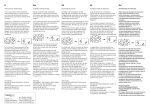
Set dipswitch10 on all connected iColor units to OFF for DMX control!
Remark: Connecting the CA-32F is optional and not needed to make the CA-32 work as described in
this manual.
FUNCTIONS (rear)
SPECIFICATIONS
Power Input:
AC/DC Power adapter:
DMX outputs:
FOOTCONTROLLER input:
Audio input:
Size:
Weight:
DC 9V 300mA minimum.
AC 240V, 50Hz Æ 9Vdc / 300mA (or more)
3pin XLR
5pin XLR
None, internal microphone
21.0 x 14.0 x 4.6cm
930 grams
11. POWER SWITCH: Used to switch the unit ON/OFF
12. DC INPUT: connect the supplied AC/DC adapter to this input. If you should use
another adapter, please make sure that it has 9Vdc and minimum 300mA with + in
the center.
13. FOOT CONTROL INPUT: Used to connect an optional CA-32F foot controller. This
foot controller makes it possible to access most of the CA-32 functions using 4 foot
switches.
14. DMX OUTPUT: Sends DMX-signals to the connected iColor projectors.
JB SYSTEMS
3/20
CA-32 COLORMIX
JB SYSTEMS
4/20
CA-32 COLORMIX