1
TGA939(e).fm Page 3 Friday, June 27, 2008 5:40 PM
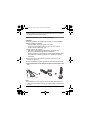
L The AC adaptor must remain connected at all times. (It is normal for
the adaptor to feel warm during use.)
Battery installation and battery charge
Important:
L Use the supplied rechargeable batteries (Part No. HHR-55AAABU).
L When installing the batteries:
– Wipe the battery ends (S, T) with a dry cloth.
– Avoid touching the battery ends (S, T) or the unit contacts.
– Confirm correct polarities (S, T).
L When replacing the batteries:
– USE ONLY rechargeable Ni-MH batteries AAA (R03) size.
– Do NOT use Alkaline/Manganese/Ni-Cd batteries.
– We recommend using the Panasonic rechargeable batteries noted
in the base unit’s operating instructions for replacement battery
information.
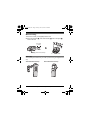
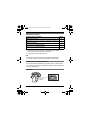
1 Press the notch on the handset cover firmly, and slide it in the
direction of the arrow.
2 Insert the batteries negative (T) end first. Close the handset cover.
3 Place the handset on the charger for about 7 hours before initial
use.
Note:
L If the batteries are fully charged, but the operating time seems to be
shorter, clean the battery ends (S, T) and the charge contacts with a
dry cloth.
For assistance, please visit http://www.panasonic.com/help
3