1
When Several Remotes Operate One Device:
To match the 972-315LM to another CGI manufactured
remote’s code (Remote Control X):
1. Begin by having both the
972-315LM and Remote Control X
available.
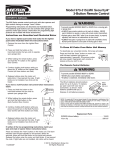
2. Press and hold both buttons on
the 972-315LM until the yellow
indicator light, visible on the
bottom through a small hole,
begins to blink. It will blink for 30
seconds; during this time it is in
the learn or training mode, and
the buttons can be released.
3. While it is in learn mode, hold
Remote Control X, another CGI
fixed or billion-code remote
control, back to back with FCC
labels touching as illustrated.
4. Press and hold the Remote
Control X push button as you
slowly slide the remotes across
each other until the 972-315LM
indicator light blinks very rapidly,
indicating it has learned the code.
(If Remote Control X is also a
972-315LM, you must press and
hold its right push button.)
5. The right button is now sending
the same identical coded signal
as Remote Control X. This code
will remain inside the 972-315LM
until replaced with another new
code by repeating steps 1-4
above, or by resetting to
Security✚®.
Resetting the Right Push Button Back to
Security✚® as Follows
Push and hold both buttons while observing
the small yellow indicator light. Hold both
buttons for ten seconds until the yellow
indicator light stops blinking. The remote has
defaulted to one of six randomly
preprogrammed Security✚® settings.
Replacement Parts
3V2032 Lithium battery (2 required) . . . . . . . . . . . . . . . .10A20
Visor clip . . . . . . . . . . . . . . . . . . . . . . . . . . . . . . . . . . . .29B137
Yellow
Indicator
Light
FCC Label
Yellow
Indicator
Light
Remote Control X
114A2589C
© 2006, The Chamberlain Group, Inc.
All Rights Reserved