1
English
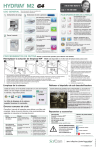
HYDRIM ® C61wd G4 Lumens Cleaning System (LCS)
The Lumens Cleaning System
(LCS) Adaptor can only be
used with HYDRIM C61wd G4
models equipped with a lumens
cleaning system. If your HYDRIM
is LCS enabled, you will see a
white plug on the inside back
left of the chamber.
Cannula Cleaning Basket (optional)
LCS Plug
(included)
LCS Adaptor and Rack
(included)
Setting up the LCS unit
1
2
Pull the quick connect
fitting ring back, insert air
line coupling and release
the ring to lock.
3
Remove the screw and
pull out the white plug on
the back wall of the unit’s
chamber.
4
Attach the LCS plug to the
HYDRIM trolley. (Stays in
the down position when
LCS rack is not being used)
Attach the LCS adaptor and rack
to the trolley, engaging the tab at
the top of the LCS plug. Place the
cannula cleaning basket on the rails
of the LCS rack.
Connecting handpieces to the LCS adaptor
1
2
3
Insert the handpiece coupling into the handpiece.
Push the handpiece into one
of the ports.
Multiflex
Screw the LCS fitting
to the appropriate
handpiece coupling.
Intramatic
Using the touchscreen menu
Example: Regular cycle
The HYDRIM will automatically
detect the presence of the
LCS adaptor. Select the
desired program and follow
the prompts. Upon completion,
open the door and remove the
handpieces from the adaptor
by pushing on the tab at the
side of the port.
1
2
3
Push tab
to release