1
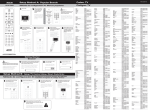
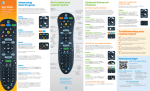
Setting Volume Controls
Codes: Set Top Boxes
Códigos: Decodificadores
PG
PG
Learning Other Remote Key Functions:
EXIT
Aprender las funciones de las teclas de otro control remoto:
Presione 9, 7, 5. El LED
titilará dos veces
Test volume keys to change TV volume. If TV
does not respond as expected, repeat this
process.
Canal + tecla de lanzamiento cuando el
televisor se apaga. Teclas de volumen para
cambiar el volumen de prueba de TV. Si el
televisor no responde como se espera,
repita este proceso.
PG
B
C
4
Canal Pulse + hasta que la
TV se apague.
D
2
1
Repeat steps 2 through 5 as
often as desired for learning
of all additional key.
PIP
0
9
LIVE
GUIDE
EXIT
PG
PG
U
MEN
D
C
3
A
2
6
B
PIP
FAV
SWAP
9
1
mno
def
INFO
3
tuv
6
wxyz
9
FAV
LIVE
2
To exit learning, press and
HOLD the SETUP key until
the LED blinks twice.
Para salir del aprendizaje,
presione y MANTENGA
APRETADA la tecla
CONFIGURACIÓN hasta
que el LED titile dos veces.
Tip/Consejo:
It will save time and cause less confusion programming LEARNING on Slate by
programming keys in order from the top to bottom of remote.
Ahorre tiempo y no se confunda al programar APRENDIZAJE en Slate programando
las teclas en orden desde la parte superior a la inferior del control remoto.
Programar una MACRO: Configuración de MACRO primaria
1
3
6
4
EXIT
7
8
9
LAST
0
INFO
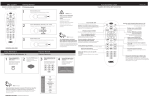
Press and HOLD the SETUP
key until the LED blinks
twice.
2
Presione y MANTENGA
APRETADA la tecla
CONFIGURACIÓN hasta que
el LED titile dos veces.
MENU
EXIT
FINDER feature at WWW.URCSUPPORT.COM
Tip/Consejo:
MENU
D
CH
abc
2
jkl
5
8
0
SWAP
MENU
Press and Hold
Enter 9-9-5 and then press
the key that will be used
for the MACRO.
Para encontrar el código exacto para su equipo, utilice
nuestra función de LOCALIZADOR DE CÓDIGOS en
WWW.URCSUPPORT.COM
3
Enter macro key sequence.
Ingrese la secuencia de
teclas de la macro.
Ingrese 9-9-5 y luego
presione la tecla que se
usará para la MACRO.
x2
Presione y mantenga
apretado
5
MENU
EXIT
MENU
SETTINGS
PG
DAY
CABLE
GUIDE
TV
Introduzca teclas 9-9-1.
1
PG
INFO
6
wxyz
Programming a MACRO: Primary MACRO Setup
Press channel + until TV
PG
x2
UP
Enter keys 9-9-1.
A
Presione y mantenga
apretado
C
DEMA
ON
ND
EXIT
LIST
1
4
7
def
mno
ON/OFF
Press and Hold
Presione la tecla de
encendido TV una
vez.
GUIDE
OK
SELECT
PAGE
VOL
3
tuv
LAST
Mantenga pulsado SETUP hasta
que el modo parpadee dos veces.
0
SE T
DAY
D
DAY
EXIT
CH
abc
2
jkl
5
8
Presione y mantenga
apretado
3
Press the TV POWER
key once.
C
DEMA
ON
ND
PAGE
VOL
LIST
1
4
Press and Hold
Configuración
los parámetros
de volumen:
Méthode D de de
programmation
: Recherche
de code
2
GUIDE
OK
Setting
VolumeD:
Controls
Setup Method
Code Search
Press and hold SETUP until
the mode key blinks twice.
CABLE
B
SE T
B
DAY
SELECT
LAST
WATCH
WATCH
CABLE
EXIT
pqrs
GUIDE
AUDIO
AUDIO
GUIDE
7
Repita los pasos 2 a 5 tan
seguido como lo desee para
aprender todas las teclas
adicionales.
D
DVD
DVD
PG
PG
ghi
C
El LED se apagará. Siga
presionando la tecla para
aprender hasta que el LED
titile dos veces.
INFO
B
6
CABLE
A
9
TV
0
8
4
7
pressing teaching key until
LED blinks twice.
UP
9
INFO
3
ON/OFF
8
D
2
5
SOSTENGA el control
remoto del que aprende
cerca del LED IR del control
remoto en el que aprendey
presione la tecla que desea
enseñar.
LAST
PG
6
4
7
Presione y
mantenga
apretado
C
Presione la TECLA que desea
aprender en Slate. El LED
brillará rápidamente de
manera intermitente.
pqrs
3
LAST
B
1
HOLD teaching remote
close to learning remote IR
LED and press key to be
taught.
ghi
2
MENU
Presione y
mantenga
apretado
x2
2
Press and Hold
4
Press KEY to be learned on
INFO
dor NO cambia, repita el
proceso utilizando el
siguiente código para la
marca de su
está completa.
1
Press and Hold
If the STB channel does NOT
change, repeat process
using the next code for your
STB brand.
3
8
Presione y MANTENGA
APRETADA la tecla
CONFIGURACIÓN hasta que
el LED titile dos veces.
3
Press 9, 7, 5. LED will blink
twice.
-
códigos. El LED titila dos
veces.
A
B C
D
en la esquina superior
derecha).
Presione y
mantenga
apretado
1
2
4
Press and HOLD the SETUP
key until LED blinks twice.
0
2
1
D
7
C
LAST
B
MENU
Presione el botón CAN+
para ver si cambia el canal
GUIDE
GUIDE
5
PG
SETTINGS
Ingrese el primer código
para la marca de su
Presione dos veces la tecla
de encendido del
x2
Press and Hold
Press the CH+ button to
see if the STB channel
changes. If it does, setup is
complete.
MENU
GUIDE
1
4
EXIT
EXIT
PG
A
Enter 1st code for your STB
brand from the code list.
LED blinks twice.
x2
B
2
Presione y MANTENGA
APRETADA la tecla
CONFIGURACIÓN hasta que
el LED titile dos veces.
3
Press STB power key
(unlabeled upper right
corner key) once.
EXIT
MENU
A
Press and HOLD the SETUP
key until LED blinks twice.
GUIDE
PG
PG
DirecTV
PG
PG
3
Comcast, Arris, Motorola, Pace
GUIDE
Presione y mantenga
apretado
Arris, Motorola, Pace
C
Presione la tecla SILENCIO. El LED titilará
cuatro veces.
Press and Hold
MENU
D
Press MUTE key. LED will blink four times.
Presione la tecla de
ENCENDIDO de TV.
U
C2
1
2
D
3
Press the TV POWER
key.
MEN
1
C
GUIDE
D
B
EXIT
MENU
x2
x2
B
A
2
Unlocking Volume (sets volume to control
STB) Press and HOLD the SETUP key until
the LED blinks twice.
Presione y MANTENGA APRETADA la tecla
CONFIGURACIÓN hasta que el LED titile dos
veces
Brand
A
PG
PG
PG
Action Keys
EXIT
C
EXIT
GUIDE
PG
MENU
Presione el botón CAN+ para
ción está completa.
MENU
PG
3
PG
x2
GUIDE
Presione y mantenga
apretado
Press the CH+ button to see
if STB changes. If it does,
setup is complete.
GUIDE
x2
PG
6
PG
Presione la tecla VOLUMEN +. El LED titilará dos
veces
2
Presione y MANTENGA APRETADA
durante tres segundos la tecla
CONFIGURACIÓN simultáneamente
con la tecla alfabética de color para
Press VOLUME + key. LED will blink twice.
A
2
x2
3
Press the TV POWER
key.
Presione la tecla de
ENCENDIDO de TV.
Para bloquear el volumen al televisor,
presione y MANTENGA APRETADA la tecla
CONFIGURACIÓN hasta que el LED titile dos
veces.
1
Press and HOLD the Cable Power
SETUP key simultaneously with
corresponding STB brands colored
letter key for three seconds..
2
Locking Volume to TV Press and HOLD the
SETUP key until the LED blinks twice.
Press and Hold
C1
1
1
9
Pace
Pioneer
Roomlinx
Samsung
Samsung
Sejin
Thomson
1
Pace
11877, 11982, 12345,
13028
11602
11982
INFO
Motorola
13678
11602
12689
13976
11478, 11978
13226, 12815, 12816,
12817, 12818, 12819,
12822, 12823
11376, 11877, 11998,
11982
11377
11877
13357
11377
11877
8
Deuromedia
DirecTV
Dish
Echostar
Enseo
Entone
Exterity
MovieBeam
Myrio
Nighthawk
nSTREAMS
NXTV
OnCommand
4
Arris
Cisco
Configuración de los parámetros de volumen:
11828
10654, 12227, 13646
11982
11377
11377
10775
11174, 12654, 11059,
11203, 12804, 12805,
12806, 12807, 12808,
12809, 13151, 13152,
11867, 11868, 11869,
11878, 13056, 13057,
13058, 13059, 13411,
13412, 13413
11376, 11998, 11982
0
Amino
GetWell TV
Guest-Tek
Huawei
Hughes Network Systems
Humax
JVC
LodgeNet
7
11998, 13028, 12302,
11481
11998, 13028, 12302,
11602, 11481, 11615,
11898, 12482
11998
11877, 11982, 12345,
13028
13744
11377
10775, 12262
10775, 12262
13661, 12530, 13066
12302, 13048
12677
LAST
ADB
A
1
B
C
2
4
Press and HOLD the SETUP
key until the LED blinks
twice.
Presione y MANTENGA
APRETADA la tecla
CONFIGURACIÓN hasta
que el LED titile dos veces.
D
3
x2
Press and Hold
6
4
7
8
9
LAST
0
INFO
Presione y mantenga
apretado
Troubleshooting
Resolución de problemas:
Problem:
Solution:
I tried all codes for my brand of device and none work.
Try CODE SEARCH (SETUP METHOD C) method or go
to www.urcsupport.com for model-based search.
Problema:
Solución:
Intenté todos los códigos para la marca de mi dispositivo y ninguno funciona.
Pruebe el método de BÚSQUEDA DE CÓDIGO (MÉTODO DE CONFIGURACIÓN C)
o visite www.urcsupport.com para obtener una búsqueda por modelo.
Problem:
Solution:
LED does not blink when a key is pressed.
Replace batteries.
Problema:
Solución:
El LED no titila cuando se presiona una tecla.
Reemplace las pilas.
WWW.URCSUPPORT.COM
© Copyright Universal Electronics 2014