1
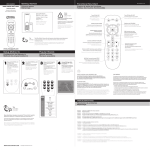
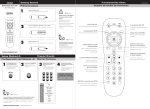
Setup Method B:
Code Search
Codes: TV
Configuración del Método B:
Búsqueda de código
Códigos: TVs
2
8
7
Mantenga presionada la
tecla OK/SELECT
(Aceptar/Seleccionar).
9
3
Let go of the OK/SELECT key
when the TV turns off.
Suelte la tecla OK/SELECT
(Aceptar/Seleccionar) cuando
el dispositivo se apague o se
encienda.
OK
GU
ER
IDE
LE
CAB
ME
NU
O
INF
E
PAG
IT
EX
TE
T
LAS
1
4
2
3
5
7
6
8
9
0
LA
NG
EXIT
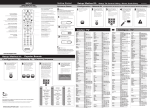
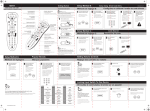
Setup Method C:
Direct Code Entry
Configuración del Método C:
Entrada Directa de Código
Aventura
Axion
Baysonic
BenQ
BGH
Blue Sky
Bradford
Broksonic
Byd:sign
Candle
Carver
Casio
Citizen
Clarion
Coby
Note/Nota: Make sure TV is ON before starting remote control setup.
Asegúrese de que el televisor esté en la posición ON de encendido antes de
comenzar la configuración del control remoto.
1
Mantenga presionada la
tecla SETUP (Configurar)
hasta que el LED parpadee
dos veces.
2
Enter the 1st TV code for
your brand from the code
list to the right. LED
blinks twice.
LANG
0
3
3
4
5
6
7
8
9
TV
POWER
Si el TV no se apaga, repita
este proceso utilizando el
siguiente código para su
marca de TV.
CABLE
DE
GUI
MENU
GUIDE
ER
POW
2
4
If TV does not turn off,
repeat this process using
the next code for your
TV brand.
TV
1
Press the TV POWER key to
test TV control. If the TV
turns off, setup is complete.
Presione el botón de
encendido para probar
el control para TV. Si la TV se
apaga, la configuración está
completa.
Ingrese el 1er código de
TV para su marca de la
lista de códigos.
9
8
7
LE
CAB
O
U
INF
LANG
MEN
0
E
PAG
T
EXI
E
MUT
T
LAS
1
4
2
3
5
7
6
8
9
0
LA
NG
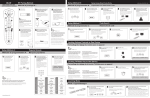
To find the exact code for your TV, use our CODE FINDER feature at WWW.URCSUPPORT.COM
Para encontrar el código exacto para su TV, utilice nuestra función de LOCALIZADOR DE
CÓDIGOS en WWW.URCSUPPORT.COM
Tip/Consejo:
Código de TV
TV code
Write the working TV code here for future use.
Escriba aquí el código de TV que funciona, para uso futuro.
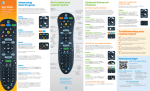
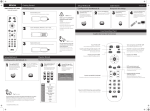
Set volume control for the TV:
Set volume control for the STB:
Ajustar el control de volumen de la TV:
Ajustar el control de volumen para el STB:
1
Press and hold SETUP for
3 seconds. The LED will
blink twice.
Mantenga presionado SETUP
(Configurar) por 3 segundos. El
LED parpadeará dos veces.
2
Press VOL +. The LED will
blink twice as confirmation.
Presione VOL +. El LED
parpadeará dos veces
como confirmación.
8
0
9
Mantenga presionado SETUP
(Configurar) por 3 segundos. El
LED parpadeará dos veces.
MUTE
2
Press MUTE. The LED will
blink 4 times.
Presione MUTE. El LED
parpadeará 4 veces.
8
0
9
PAGE
LANG
2
Commercial Solutions
Contec
Continental
Coradir
Craig
Crown
Curtis
Curtis Mathes
CXC
Daewoo
Dell
Delta
Denon
Denstar
Digital Lifestyles
Disney
Durabrand
Dynex
Electrograph
Electrohome
Elektra
Element
Emerson
Emprex
Encross
Envision
ESA
Fujitsu
Funai
Futuretech
Gateway
GE
GFM
Go Video
GoldStar
GPX
Gradiente
Grundig
Grunpy
Haier
Hallmark
Hanns.G
Hannspree
Harvard
Helios
Hewlett Packard
Hikato
Himitsu
1803
0873
1675, 1207, 1676, 1688,
1689, 1692, 1935, 2232
0180
0180
1365, 1590, 2014, 2087,
2402, 2621
1623
0890, 1217, 2397
1531, 1738
0180
1564, 0180, 0802, 0846,
0875, 1766, 1803, 1937,
1951, 2121, 2513, 3065
0171
1937
0180
1032, 1315
0876
2153
0180
1935
1309
0186
0170
1205
0186, 1935
0180
1538, 1634, 2017, 2306,
2314, 2315, 2326, 2338,
2340, 2344, 2345, 2348,
3202
1447
0180
2357
2844
0180
0180
1200, 2352, 2397, 2855,
2859
0145, 1661
0180
1661, 0661
1264, 1080
1369
0145
0628
1765, 1822
1665, 1892
0180, 0178, 0171, 1665
1463, 1785, 2049
1755, 1623
1670
1661
1687, 1886, 2183
1864, 0180, 0178, 0171,
1661, 1394, 1665, 1886,
1963
1422, 1765
0876, 1474
0813, 1365, 2014, 2087
0171, 1963
0809, 0186, 0683
0180, 0171, 1963
0180
1755, 1756
1447, 0178
1864, 0171, 1665, 1886,
1963
0886, 1823, 1831
0178
2693
0170
0683
0180
1753, 2293, 2494, 2690,
3204
0178
1783
1348, 1745, 1783
0180
0865
1494, 1088
0628
0180, 0628
Hisense
Hitachi
Hitech
HP
Hyundai
I-Inc
iLo
Initial
Insignia
iRIS
IRT
IX
JCM
Jensen
JVC
KDS
KEC
Kioto
Konka
Kost
Kreisen
KTV
Lasonic
LG
LiteOn
LodgingStar
LXI
MAG
Magnavox
Marantz
Maxent
Megatron
Memorex
MGA
Mintek
Miray
Mitsubishi
Multitech
NAD
Naxa
NEC
NetTV
NEX
Nexus Electronics
Nikko
Niko
Nimbro
Norcent
Norwood Micro
NuVision
Olevia
Onwa
Optoma
Orion
Panasonic
PARK
PDI
Penney
Philco
Philips
Pioneer
Planar
Polaroid
Portland
Prima
Proscan
Proton
Protron
Proview
Punktal
Pyle
1314, 1660, 2098
1643, 0145, 0797, 2215,
2433, 2679, 2879
1814
1494, 1088
0849, 1219, 1294, 1814
1746
1463, 1286, 1394, 1603,
1665, 1684, 1990
1603, 1990
1423, 1564, 0171, 1204,
1517, 1660, 1710, 1785,
1892, 1963, 2049, 2417
2189
1661, 0628
0877
2189, 2256
1299
1601
1498, 1687
0180
0706, 0628
0628, 1831
1483
0876, 1474
0180
3198
1423, 1447, 0178, 0856,
1530
1088
3147
0156, 0178
1498, 1687
1454, 1866, 1755, 0171,
0706, 0186, 0802, 1198,
1365, 1525, 1867, 1963,
1990, 2655
1454, 0704, 1398
1755, 1211, 1757
0178, 0145
0150, 0178, 0877, 1665,
1670, 1785, 1892, 2739
0150, 0178
1603, 1990
3309
1250, 0150, 0178, 1797
0180
0156, 0178
2104, 2735
0170, 0704, 0876, 1398,
1797, 2026
1755, 2753
1814
2183
0178
1581
2104
0824, 1365, 1590, 1591,
1745
1286, 1303
1657, 2158
1610, 1144, 1240
0180
1348
1463
1480
2104
1474
0156, 0178
0145, 0171, 1661, 1394,
1665, 1963
1454, 1866, 0171, 0899,
1394, 1483, 1867
1457, 1398
1496
0865, 1286, 1314, 1328,
1341, 1498, 1538, 1687,
1766, 1767, 2063, 2121
1661
1753, 1785
1447, 2147, 2183, 2256
0178
1320
1498, 1687
2687
1200, 2196
RadioShack
RCA
Realistic
Recco
RevolutionHD
Runco
Sampo
Samsung
Sansui
Sanyo
Sceptre
Scotch
Scott
Sears
Semivox
Semp
Sharp
Sherwood
Simpson
Skyworth
Solarism
Sole
Sony
Soundesign
Sova
Soyo
Spectroniq
Squareview
SSS
Starlite
SunBriteTV
Superscan
Supersonic
SVA
Sylvania
Symphonic
Syntax
Tatung
TCL
Teknika
TMK
Tophouse
Toshiba
TruTech
US Logic
Vidikron
Vidtech
Viewsonic
Viore
Visart
Vito
Vizio
Wards
Waycon
Westinghouse
White Westinghouse
Wyse
Yamaha
Zenith
0180, 0178
1447, 1661, 0899,
1781, 2434, 2746, 2932
0180, 0178
0706
1623
1398
1755
0178, 0766, 0814,
1060, 2051
0171, 1463, 1409,
1670, 1892, 1935
1142
0878, 1217, 1360,
1599, 2337
0178
0180, 0178, 1711
0156, 0178, 0171
0180
0156, 1743
0818, 2402
1399
0186
1799
1220
1377, 1483, 1530, 1623
0810, 1685
0180, 0178, 0186
1320
1520, 1746, 1826,
1828, 1830, 1831
1498, 1687
0171
0180
0180
1610, 1420, 1435, 2337
0864
1753, 2104, 2784,
3154, 3204
0865, 0871, 1963
1864, 0171, 1314,
1394, 1665, 1886, 1963
0180, 0171, 1394
1610, 1144, 1240
1286, 1756, 2496
2434
0180, 0150, 0186
0178
0180
1524, 0156, 1343,
1369, 1743, 1935
1665, 1723
1286, 1303
1398
0178
1755, 1564, 0797,
0864, 0885, 1330,
1365, 1578, 1627,
1742, 2014, 2049,
2087, 2277
1207, 1684, 2104,
2352, 3094, 3118
1336
1320
1758, 0864, 0885,
1756, 2707
0156, 0180, 0178, 0186
0156
0885, 0890, 1217,
1282, 2195, 2293, 2499
1661
1365
0797
1423, 0178, 0145,
1661, 1365
MUTE
LAST
LAST
1
EXIT
INFO
7
PAGE
LANG
1
Press and hold SETUP for
3 seconds. The LED will
blink twice.
EXIT
INFO
7
America Action
Anam
AOC
Aomni
Apex Digital
Astar
Audinac
Audiovox
POW
SELECT
INFO
Press and hold SETUP until
LED blinks twice.
Accurian
Action
Akai
MENU
GUIDE
LANG
TV
0
Press and hold down the
OK/SELECT key.
MU
Note/Nota:
Make sure TV is ON
before starting remote
control setup.
Asegúrese de que la TV
esté prendida antes de
comenzar la configuración del control remoto.
1
Press and hold SETUP until
LED blinks twice.
Mantenga presionada la
tecla SETUP (Configurar)
hasta que el LED parpadee
dos veces.
MUG2068S-F
3
1
2
3
WWW.URCSUPPORT.COM
© Copyright Universal Electronics 2012