1
7
7 Troubleshooting
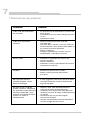
Problem
Remedy
Green Power LED is off
• Is the power cable plugged in?
• Is the power switch set to ON (I)?
• Check the main fuse in the power socket.
Red Protect LED illuminates
• Check that the maximum permissible number of
consoles has not been exceeded (30).
• Disconnect all consoles and cables. If the LED still
illuminates, send the power supply unit to an
authorized workshop for repair.
• Activate the test mode.
• Connect the consoles and cables one at a time to
the power supply unit and check their functions.
No sound
• Check the volume setting on the chairman
console.
• Activate the test mode.
• Check that all Minicon plugs are fully inserted
(locked) into their sockets.
Feedback (whistling)
• Move the consoles farther apart.
• Reduce the system volume on the chairman
console.
Delegate microphone cannot be
activated, lightring on
microphone arm blinks
• The maximum number of simultaneously active
microphones has been reached. Increase the limit
or deactivate one of the other microphones.
Echoes and feedback when
system is connected to a distant
party via optional AEC/Telco
Audio Interface and external telephone hybrid or videoconference
codec.
• Adjust audio levels of the external telephone hybrid
or videoconference codec.
• Check external telephone hybrid or videoconference codec if acoustic echo cancellation
(AEC) is activated.
• Redial for a possibly better telephone connection.
• Ask connected distant party to check their system
for correct settings.
English
14