1
TK100
GB
I
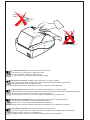
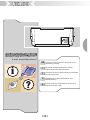
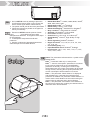
1 Go into SETUP mode by starting to press the
LineFeed Key before switch on the printer and
wait 3 acustic signal before release the key
2 The printer should print all list of the parameters.
3 Follow the instructions printed on the paper for
the key functionality.
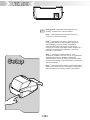
1 Entrare nel SETUP tenendo premuto il tasto
Feed
prima dell’accensione della
stampante ed attendere tre segnali acustici, dopo
di che rilasciarlo .
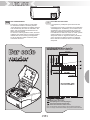
2 La stampante stamperà la lista di tutti i
parametri.
3 Seguire le indicazioni stampate direttamente
sulla carta per la funzionalità dei tasti.
Setup
GB
(1)
D
·
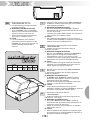
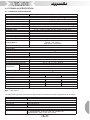
RS232 Baud Rate : 115200, 57600,38400, 19200 ,
9600, 4800, 2400, 1200.
·
RS232 Data length(1): 7, 8D bits/char.
·
RS232 Parity(1): NoneD, even or odd.
·
RS232 Handshaking(1): XON/XOFF or HardwareD.
·
Busy condition(1): OffLine/RxFull or RxFullD .
·
Autofeed: CR disabledD or CR enabled.
·
Print mode: NormalD or Reverse.
·
Chars/inch: A=11 B=15 cpi, A=15 B=20 cpiD.
·
Speed/Quality(2) : NormalD, High Quality or High
Speed.
·
Notch alignment: DisabledD, Enabled.
·
Notch Threshold(3): 2.0, 2.25, 2.5, 2.75, 3.0, 3.25,
3.5D, 3.75, 4.0.
·
Print Offset(4)[mm]: 11,0,
·
PaperEnd Buffer Clear: DisabledD, Enabled.
·
Print Density: -50%, -37%, -25%, -12%, 0D ,+12%,
+25%,+37%, +50%.
Notes: The parameters indicates with a D symbol are the
default values.
Note (1) : Parameter valid only on serial printer.
Note (2) : “Current consumption” parameter is not setted
by the user but it depends on the “Speed/Quality”
parameter in this way: choosing the normal or high
speed parameter, the current consumption will be setted
as high current; choosing the low speed parameter, the
current consumption will be setted in low current.
Note (3) : The parameter “Notch distance” is displayed
and enabled only in case that the notch alignment
parameter is enabled. The parameter “Notch distance” is
used to set the exact distance of the notch entering the
desired value in millimetre and in deci-millimetre.
Note (4) : The parameter “Print Offset” is the distance of
the notch from printing line, entering the desired value in
millimetre and in deci-millimetre.
<15>