1
◈ Specifications
Item
Printing Method
Dot Density
Printing Width
Characters per
line
Printing Speed
*1)
Printer
Receive Buffer
Size
SMPS Input
Voltage
Environmental
Conditions
MCBF *2)
Paper
Paper Width
Paper Thickness
Roll Diameter
Paper Tube
Details
Thermal Line Printing
203 Dpi (8 dot/mm)
48mm
32 (Font A : 12x24)
42 (Font B : 9x17 / Font C : 9x24)
Approximately 2.75 inches/sec
70 mm/sec
at 25℃/printing duty 12.5%
15K bytes
100 ~ 240 VAC
Temperature
Humidity
0 ~ 45℃ (Operating)
-20 ~ 60℃ (Storage)
10 ~ 80% RH (Operating)
10 ~ 90% RH (Storage)
30,000,000 line
50km
Mechanism
Head
58.0±0.5mm
Paper thickness : 0.062 ~ 0.075 mm
Ø60 mm
Inner : Ø12mm (0.47”)
Outer : Ø18mm (0.71”)
※ Note
*1) Printing speed may be slower depending on the data transmission
speed and the combination of control commands.
*2) This value is measured for a given condition such as standard
temperature, specified paper, and standard printing density, and it
may change depending on the temperature or printing level.
◈ Serial(RS-232C) Fixed Interface Model
Windows Driver Installation
1. After running the product installation CD, run the Thermal Printer >
STP-103II > Drivers > Windows Driver > Drivers Folder > STP103II_ WIN_Vx.x.x.exe file.
2. In the opening installation window, click on Next.
3. In the Ready to Install the Program window, click on Install.
4. In the Select Port Type window, select one Serial Port and click
Next.
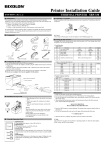
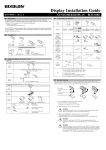
(Figure 1.)
5. In the Question window, select Yes and the computer will reboot.
6. After rebooting, open Start > Settings > Printers & Fax > BIXOLON
STP-103II Icon > Right-Click > Properties.
7. In the Properties window, select the Port tab and click on the Port
Settings. Check to see that the information is identical to the self-test
results after installation.
◈ Parallel (IEEE1284) Fixed Interface Model
Windows Driver Installation
1. After running the product installation CD, run the Thermal Printer >
STP-103II > Drivers > Windows Driver > Drivers Folder > STP103II_ WIN_Vx.x.x.exe file.
2. In the opening installation window, click on Next.
3. In the Ready to Install the Program window, click on Install.
4. In the Select Port Type window, select one Parallel Port and click
Next. (Refer to Figure 1.)
5. In the Question window, select Yes and the computer will reboot.
6. After rebooting, open Start > Settings > Printers & Fax > BIXOLON
STP-103II Icon > Right-Click > Properties.
7. In the Properties window, after selecting the General tab, click on
Print Test Page to confirm that printing is normal.
◈ USB Fixed Interface Model
Windows Driver Installation
1. After running the product installation CD, run the Thermal Printer >
STP-103II > Drivers > Windows Driver > Drivers Folder > STP103II_ WIN_Vx.x.x.exe file.
2. In the opening installation window, click on Next.
3. In the Ready to Install the Program window, click on Install.
4. In the Select Port Type window, select USB and click Next.
(Refer to Figure 1.)
5-1. If using Windows 2000/VISTA/2008 Server/7:
① After the Information window appears, turn the printer off and
back on and click Yes.
② After installation is complete, reboot the computer.
5-2. If using Windows XP/2003 Server:
① After the Information window appears, turn the printer off and
back on and click Yes.
② After the New Hardware Detected window appears, continue to
click Next to install the USB drive, and then reboot the computer.
※ Note
When the digital registration message appears during installation, click
on either OK or Continue Anyway.
6. After rebooting, open Start > Settings > Printers & Fax > BIXOLON
STP-103II Icon > Right-Click > Properties.
7. In the Properties window, after selecting the General tab, click on
Print Test Page to confirm that printing is normal.
◈ WEEE (Waste Electrical and Electric Equipment)
This marking shown on the product or its literature, indicates that
is should not be disposed with other household wastes at the end
of its working life, To prevent possible harm to the environment
or human health from uncontrolled waste disposal, please
separate this from other types of wastes and recycle it responsibly
to promote the sustainable reuse of material resources. Household
users should contact either the retailer where they purchased this
product, or their local government office, for details of where and
how they can take this item for environmentally safe recycling.
Business users should contact their supplier and check the terms
and conditions of the purchase contract. This product should not
be mixed with other commercial wastes for disposal.
☎ BIXOLON Co., Ltd.
● Website http://www.bixolon.com
● Korea Headquarters
(Add) 7th~8th FL, Miraeasset Venture Tower, 685, Sampyeong-dong,
Bundang-gu, Seongnam-si, Gyeonggi-do, 463-400, Korea
(Tel.) +82-31-218-5500
● U.S. Office
(Add) BIXOLON America Inc., 3171 Fujita St, Torrance, CA 90505
(Tel.) +1-858 764 4580
8. In the Properties window, after selecting the General tab, click on
Print Test Page to confirm that printing is normal.
● Europe Office
(Add) BIXOLON Europe GmbH, Tiefenbroicher Weg 35 40472
Düsseldorf
(Tel.) +49 (0)211 68 78 54 0