1
Start Here
Guia de instalação
3
Epson Stylus CX3700 Series
®
Please read these instructions before using the product.
Por favor, leia estas instruções antes de usar o produto.
1
1
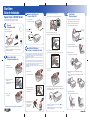
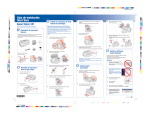
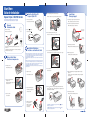
Turn On the Stylus CX
Ligue a Stylus CX
4
5
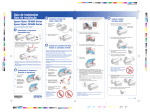
Insert the cartridges in the holder for each color.
Encaixe os cartuchos no suporte correspondente a cada cor.
1
Connect the power cable.
Open the paper support and pull up its extensions.
Abra o suporte para papel e as suas extensões.
Conecte o cabo de alimentação.
2
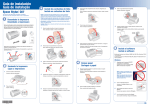
Unpack
Desembale tudo
Open the output tray and pull out its extension.
Abra a bandeja de papel e a sua extensão.
2
Remove all the tape.
Load Paper
Carregue papel
Press the
On button.
Pressione o botão
Remova toda a fita adesiva.
Paper support
Suporte para papel
.
5
Press the cartridges down until they click.
Pressione os cartuchos até que eles “cliquem” no lugar.
Output tray
Bandeja de papel
4 ink cartridges
4 cartuchos de tinta
3
If any of these parts are missing, contact Epson® as described on the back
of this sheet.
4
Se algum dos itens estiver faltando, entre em contato com a Epson®
conforme descrito neste pôster.
Mova o protetor do alimentador para a frente.
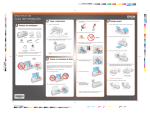
Install Ink Cartridges
Instale os cartuchos de tinta
6
Close the ink cartridge cover and press it down.
Feche a tampa do suporte e pressione-a até que se encaixe no lugar.
2
Unlock the Printer
Destrave a impressora
Flip the feeder guard forward.
Note: The ink cartridges that came with your printer have a lower yield due
to the ink charging process. This process is carried out the first time you
turn on your printer and guarantees better performance. Don’t load paper
before installing the ink cartridges.
4
Slide the edge guide left.
Deslize a guia esquerda para a esquerda.
Caution: Keep ink cartridges out of the reach of children and don’t drink
the ink.
Nota: Os cartuchos de tinta incluídos terão um rendimento menor devido
ao processo de inicialização. Este processo só é realizado a primeira vez
que o produto é ligado e garante um melhor rendimento do mesmo. Não
carregue papel antes de instalar os cartuchos de tinta.
1
Lift up the scanner.
Cuidado: Mantenha os cartuchos de tinta fora do alcance das crianças e
não beba a tinta.
Abra a unidade do scanner.
7
Close the scanner.
Feche o scanner.
1
5
Lift up the scanner.
Abra a unidade do scanner.
2
Load paper against the right edge guide and slide the left edge
guide over.
Carregue o papel contra a borda direita e deslize a guia esquerda
contra o papel.
Remove the tape from the ink
cartridge holder.
Remova a fita adesiva do suporte dos
cartuchos de tinta.
8
2
Abra a tampa do suporte dos
cartuchos de tinta.
3
Press the
ink button to charge ink. Charging takes about 2 minutes.
Letter
Carta
Open the ink cartridge cover.
Pressione o botão de tinta para carregar a tinta. O carregamento leva
aproximadamente 2 minutos.
6
4 x 6 in.
4 x 6 pol.
Flip the feeder guard back.
Mova o protetor do alimentador para trás.
Close the scanner.
Feche o scanner.
3
Shake the ink cartridges,
then unpack them.
Balance os cartuchos
de tinta e depois
desembale-os.
Caution: Don’t turn off the Epson Stylus CX while the
flashing or you’ll waste ink.
Cuidado: Não desligue a Epson Stylus CX quando a luz
piscando ou desperdiçará tinta.
On light is
estiver
Letter
Carta
4 x 6 in.
4 x 6 pol.